What is a Unified API?
Learn how a unified API normalizes data across SaaS platforms, abstracts away authentication, and accelerates your product's integration roadmap.


What is a Unified API?
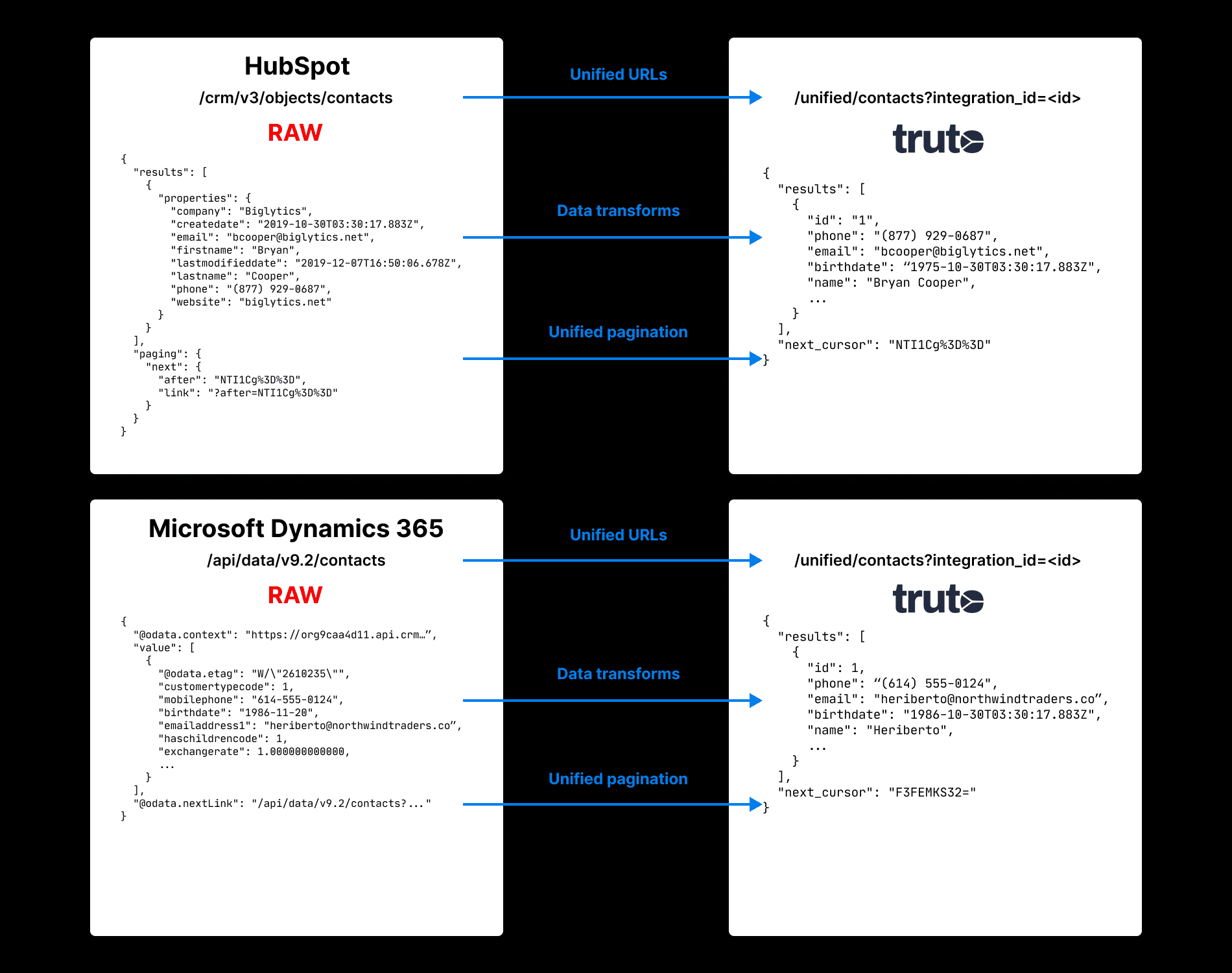
A unified API normalizes data across multiple third-party APIs into a single schema. If you integrate Salesforce and Close, you'll notice Salesforce calls them 'Contacts' while Close calls them 'Persons'. A unified API abstracts this away. You interact with one standard entity, and the API handles the underlying translation.
Modern unified APIs also provide managed OAuth flows and standardized pagination across all supported providers.
Common Data Model
Without a unified API, you map hundreds of distinct entities across every integration. With a unified CRM API, you query a single Contacts endpoint. You don't need to read the Close documentation to find out they call it a Person. You write against the common data model once, and it works across every supported provider.
The Case for Unified APIs
This comment from a frustrated Redditor highlights why building third-party integrations is a massive time sink:
I always dislike doing integration with 3rd party APIs. Other than Stripe, the documentation is almost always terrible. It's not tailored to my language, there's too many links to other things I don't need to know in the beginning, and asks me to make choices on things I don't know anything about yet.
Then, I have to pick from a variety of client libraries, some of questionable quality, because the service couldn't be bothered to maintain an official lib (I'm not using esoteric langs), and then authentication is always a pain.
That's all before I get to the good stuff of just getting to play the data. And that's when I actually care about getting to use the API.
Other times, I just want it over and done with, because it's not the core of the product, and I feel like integration is just this long slog and chore.
Does anyone else feel this way? How do you deal with getting through integration quickly or painlessly?
-
Organizations use an average of 130 SaaS solutions (source). These systems need to communicate.
-
Application growth continues with organizations using an average of 1,061 different applications. Just 29% of these applications are integrated. (source)
-
Integration hinders digital transformation for 80% of organizations. (source)
How Useful is a Common Data Model Really?
-
Without it, engineers write custom data mapping logic for every new integration. This is tedious, error-prone, and scales poorly.
-
With a common data model, adding a new integration requires zero new mapping code. You authenticate the user, and the existing unified integration works immediately.
What is Unified API Also Known as?
-
Meta API
-
Universal API
-
Unified schema
-
Common data model
How do Unified API Solutions Work?
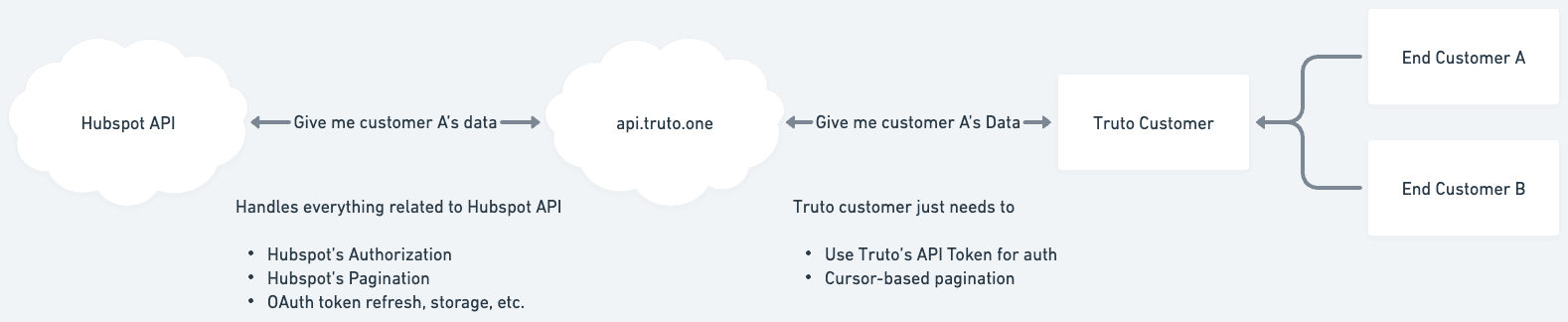
Unified APIs act as an abstraction layer between your application and dozens of third-party APIs. Under the hood, a modern unified API architecture cleanly separates three concerns: the unified interface (what developers call), the proxy layer (how third-party calls are made), and the mapping layer (how data is transformed).
When you make a request to a unified endpoint, the system:
- Maps your unified query parameters into the specific format the target integration expects.
- Calls the lower-level proxy layer, which handles the raw HTTP request, authentication (OAuth tokens, API keys), pagination, and rate limiting.
- Evaluates a set of JSONata expressions to transform the raw third-party response back into the canonical unified schema.
graph TD
    A[Your App] -->|Unified Request| B(Unified API Router)
    B -->|Map Request| C{Mapping Engine}
    C -->|Proxy Call| D[Proxy Layer]
    D -->|Raw HTTP| E((Third-Party API))
    E -->|Raw Response| D
    D -->|Raw JSON/XML| C
    C -->|JSONata Transform| B
    B -->|Unified Response| A
Because the mapping layer uses a powerful expression language like JSONata, it can handle complex transformations - conditionals, array transforms, and date formatting - ensuring the output shape is identical whether the underlying data came from Salesforce or HubSpot.
What are Some Popular Categories of Unified APIs?
Here are some popular unified APIs:
Unified CRM API
A unified CRM API normalizes data from platforms like Salesforce, HubSpot, Pipedrive, and Close. It abstracts away provider-specific endpoints so your application can manage pipelines, track interactions, and update sales records using a single schema.
The data model typically revolves around a core trinity: Accounts (companies), Contacts (people), and Opportunities (active deals). You also get standardized endpoints for Engagements, Notes, and Tasks to build a historical timeline of a deal.
This normalization is highly effective for AI agents. For example, an agent can capture an inbound lead, enrich the company data, create the Account and Lead, and generate a Task for the right sales rep based on territory rules. Another common pattern is automated meeting logging, where an integration parses meeting transcripts and logs the summarized Notes against the correct Contact and Opportunity.
flowchart LR
  subgraph contacts[Contacts]
    direction LR
    c1[Salesforce: Contacts] & c2[HubSpot: Contacts] & c3[Pipedrive: Persons] & c4[Close: Contact] --> trutoC[Truto: Contacts]
  end

  subgraph users[Users]
    direction LR
    u1[Salesforce: Users] & u2[HubSpot: Owners] & u3[Pipedrive: Users] & u4[Close: User] --> trutoU[Truto: Users]
  end

  subgraph accounts[Accounts]
    direction LR
    a1[Salesforce: Account] & a2[HubSpot: Organisation] & a3[Pipedrive: Organisation] & a4[Close: Lead] --> trutoA[Truto: Accounts]
  end
Unified CRM API with Salesforce, HubSpot, Pipedrive and Close.
Unified Accounting API
A unified accounting API enforces standard double-entry accounting logic across diverse financial platforms like QuickBooks, Xero, Wave, and Zoho. It handles the full financial lifecycle, from core ledger configuration (Accounts, JournalEntries) to Accounts Receivable (Invoices, Payments) and Accounts Payable (Expenses, PurchaseOrders).
Engineers use this to build automated order-to-cash workflows. When an order is placed on an external e-commerce platform, the system automatically creates a Contact, generates an Invoice with the correct line Items, and logs the Payment upon checkout to keep the ledger synced. It also simplifies intelligent expense parsing, where an automated processor extracts receipt data, queries the API to find the matching Account (like "Meals & Entertainment"), creates an Expense, and uploads the receipt image.
flowchart LR
  subgraph invoices[Invoices]
    direction LR
    i1[QuickBooks: Invoice] & i2[Xero: Invoice] & i3[Wave: Invoice] & i4[Zoho: Invoice] --> trutoI[Truto: Invoices]
  end

  subgraph contacts[Contacts]
    direction LR
    c1[QuickBooks: Customer] & c2[Xero: Contact] & c3[Wave: Customer] & c4[Zoho: Contact] --> trutoC[Truto: Contacts]
  end

  subgraph accounts[Accounts]
    direction LR
    a1[QuickBooks: Account] & a2[Xero: Account] & a3[Wave: Business] & a4[Zoho: Organization] --> trutoA[Truto: Accounts]
  end
Unified Accounting API with QuickBooks, Xero, Wave, and Zoho Books.
Unified HRIS API
A unified HRIS API provides a consistent schema to read and write HR and payroll data across systems like Gusto, Rippling, SAP SuccessFactors, and Keka. The Employee entity is the nexus of this graph, linking to Employments (start dates, contract types), JobRoles, Locations, and Groups. It also standardizes complex domains like compensation, benefits, and time-off balances.
The most common engineering use case is automated identity provisioning. By polling the Employees and Employments endpoints, IT systems can automatically provision or de-provision software licenses and access levels when someone joins or leaves the company. It also enables reliable directory synchronization to build unified internal org charts by mapping Employees to their respective Groups and JobRoles.
flowchart LR
  subgraph employees[Employees]
    direction LR
    e1[Gusto: Employee] & e2[Rippling: Person] & e3[SAP SF: User] & e4[Keka: Employee] --> trutoE[Truto: Employees]
  end

  subgraph departments[Departments]
    direction LR
    d1[Gusto: Department] & d2[Rippling: Department] & d3[SAP SF: Cost Center] & d4[Keka: Department] --> trutoD[Truto: Departments]
  end

  subgraph payruns[Pay runs]
    direction LR
    p1[Gusto: Pay run] & p2[Rippling: Pay run] & p3[SAP SF: Payroll] & p4[Keka: Pay run] --> trutoP[Truto: Pay runs]
  end
Unified HRIS API with Gusto, Rippling, SAP Success Factors, and Keka.
Unified ATS API
A unified ATS API allows programmatic systems to manage job postings, candidate pipelines, and hiring outcomes across platforms like Lever, Greenhouse, Workable, and Recruitee. The architecture is pipeline-driven: Jobs define a sequence of JobInterviewStages, and a Candidate submits an Application that traverses these stages.
You can use this to build custom, real-time career pages by fetching Jobs, Departments, and dynamic JobFormFields. For AI-driven sourcing, an agent can parse inbound LinkedIn profiles, automatically create a new Candidate, attach their parsed resume, and generate an Application for the most relevant open role. You can also automate pipeline triage by monitoring submitted Scorecards and automatically moving an Application to the next stage if the feedback is universally positive.
flowchart LR
  subgraph candidates[Candidates]
    direction LR
    c1[Lever: Candidate] & c2[Greenhouse: Candidate] & c3[Workable: Candidate] & c4[Recruitee: Candidate] --> trutoC[Truto: Candidates]
  end

  subgraph jobs[Jobs]
    direction LR
    j1[Lever: Opportunity] & j2[Greenhouse: Job] & j3[Workable: Job] & j4[Recruitee: Job] --> trutoJ[Truto: Jobs]
  end

  subgraph applications[Applications]
    direction LR
    a1[Lever: Application] & a2[Greenhouse: Application] & a3[Workable: Application] & a4[Recruitee: Application] --> trutoA[Truto: Applications]
  end
Unified Ticketing API
A unified ticketing API normalizes information from issue tracking and support systems like Asana, ClickUp, Linear, Jira, and Zendesk. The model centers on Tickets, governed by strict TicketStatus, TicketTypes, and TicketPriorities. Tickets exist within Workspaces and are assigned to internal Users or Teams, while external Contacts and Accounts represent the requesters.
This API is heavily used for cross-platform syncing. When an external customer opens a Zendesk Ticket, an orchestration loop can automatically generate an identical Ticket in Jira for the engineering Workspace, keeping Comments and statuses in sync between the two tools. It also powers automated triage, where an AI agent analyzes inbound emails, assigns the correct tags, and routes the Ticket to the appropriate Team.
flowchart LR
  subgraph tickets[Tickets]
    direction LR
    t1[Zendesk: Ticket] & t2[Jira: Issue] & t3[Linear: Issue] & t4[Front: Conversation] --> trutoT[Truto: Tickets]
  end

  subgraph comments[Comments]
    direction LR
    c1[Zendesk: Comment] & c2[Jira: Comment] & c3[Linear: Comment] & c4[Front: Message] --> trutoC[Truto: Comments]
  end
Unified Ticketing API with Zendesk, Jira, Linear, and Front.
Unified File Storage API
A unified file storage API provides a standardized data model to interact with cloud storage providers like Google Drive, Dropbox, OneDrive, and Box. It abstracts away provider-specific folder structures and permissions, allowing programmatic systems to traverse directories and manipulate files using a single schema.
The core universal entity is the DriveItem, which represents any object within a storage volume - whether it's a file, a folder, or a shortcut. Because a DriveItem can contain other DriveItems as children, you can easily navigate the directory tree. The API also standardizes access control, mapping Permissions to specific Users or Groups for each item.
This normalization is highly effective for AI agents and automated workflows. For example, an agent building a semantic search index can recursively crawl a drive by listing DriveItems, checking if an item is a folder to traverse deeper, or downloading the document binary to feed into a vector database. It also simplifies automated provisioning, where a workflow creates a new project folder structure and applies strict permissions granting access only to the relevant team groups.
flowchart LR
  subgraph driveitems[DriveItems]
    direction LR
    f1[Google Drive: File] & f2[Dropbox: File] & f3[OneDrive: DriveItem] & f4[Box: File] --> trutoF[Truto: DriveItems]
  end

  subgraph permissions[Permissions]
    direction LR
    p1[Google Drive: Permission] & p2[Dropbox: Member] & p3[OneDrive: Permission] & p4[Box: Collaboration] --> trutoP[Truto: Permissions]
  end
Unified User Directory API
A unified user directory API provides a standardized schema to manage identity, access, and organizational structure across identity providers like Google Workspace, Microsoft Entra ID, and Okta. It abstracts provider-specific implementations, allowing developers to manage users, roles, licenses, and groups through a single interface.
The model operates on an identity-centric relational graph. Organizations and Workspaces act as the fundamental containers. The User is the core node, belonging to Groups and receiving specific permissions via RoleAssignments. The API also tracks resource consumption by monitoring how Licenses are distributed among users.
Engineers use this to build automated onboarding and offboarding flows. You can programmatically create users, assign them to departmental groups, and provision software licenses on day one - or instantly revoke access when an employee leaves. It also powers centralized access management, ensuring least-privilege access across connected tools by synchronizing application permissions with the directory's defined roles.
flowchart LR
  subgraph users[Users]
    direction LR
    u1[Google Workspace: User] & u2[Entra ID: User] & u3[Okta: User] --> trutoU[Truto: Users]
  end

  subgraph groups[Groups]
    direction LR
    g1[Google Workspace: Group] & g2[Entra ID: Group] & g3[Okta: Group] --> trutoG[Truto: Groups]
  end

  subgraph activities[Activities]
    direction LR
    a1[Google Workspace: Event] & a2[Entra ID: AuditLog] & a3[Okta: LogEvent] --> trutoA[Truto: Activities]
  end
How to Integrate Multiple Calendar Services (Google + Microsoft)
Building a native integration with Google Calendar and Microsoft Outlook - plus scheduling tools like Calendly - means dealing with three different OAuth flows, two different webhook models (Google Push Notifications vs. Microsoft Graph subscriptions), and provider-specific expiry rules. A unified calendar API collapses this into a single interface. Here is what a working integration looks like end to end.
flowchart LR
  subgraph events[Events]
    direction LR
    e1[Google Calendar: Event] & e2[Outlook: Event] & e3[Calendly: Scheduled Event] --> trutoE[Truto: Events]
  end

  subgraph calendars[Calendars]
    direction LR
    c1[Google Calendar: Calendar] & c2[Outlook: Calendar] & c3[Calendly: EventType] --> trutoC[Truto: Calendars]
  end

  subgraph availability[Availability]
    direction LR
    a1[Google: freeBusy] & a2[Outlook: getSchedule] & a3[Calendly: available_times] --> trutoA[Truto: Availability]
  end
Prerequisites and Demo App Setup
Before any code, get these pieces in place. The setup is roughly a 30-minute exercise.
Accounts and credentials you need:
- A Truto account with an API key generated from the dashboard.
- Google Cloud Console: Create a project, enable the Google Calendar API, and create OAuth 2.0 client credentials. Add your callback URL as an authorized redirect URI. If you're letting Truto own the OAuth flow, use the Truto-provided redirect URI instead.
- Microsoft Entra ID (formerly Azure AD): Register an app under App Registrations, grant
Calendars.ReadWriteandoffline_accessAPI permissions, and generate a client secret. - Calendly (optional): Create an OAuth application in the developer portal if you want scheduling-link coverage.
- A publicly reachable HTTPS endpoint for webhooks. For local development, expose your dev server with
ngrokorcloudflared tunnel.
Minimum viable demo app. This is what an engineer runs before lunch to confirm the flow works:
mkdir calendar-poc && cd calendar-poc
npm init -y
npm install express dotenv
touch .env server.js
Drop your credentials into .env:
TRUTO_API_KEY=trt_live_...
TRUTO_WEBHOOK_SECRET=whsec_...
GOOGLE_CLIENT_ID=...
GOOGLE_CLIENT_SECRET=...
MS_CLIENT_ID=...
MS_CLIENT_SECRET=...
APP_BASE_URL=https://<your-tunnel>.ngrok.app
A minimal server.js skeleton to receive the OAuth callback and webhooks:
import 'dotenv/config'
import express from 'express'

const app = express()

app.get('/oauth/callback', (req, res) => {
  // exchange req.query.code with the provider (or hand off to Truto)
  res.send('Connected. You can close this tab.')
})

app.post('/webhooks/truto', express.raw({ type: 'application/json' }), (req, res) => {
  // signature verification comes later in this post
  res.status(200).send('ok')
})

app.listen(3000, () => console.log('listening on :3000'))
That's enough scaffolding to walk through OAuth, availability, event creation, and webhooks in the next few sections.
Quickstart: OAuth 2.0 for Google and Microsoft
With Truto, you don't manage the OAuth exchange yourself. You embed the Link UI or redirect users to a hosted authorization URL, and Truto handles the token exchange, encryption, and refresh scheduling. If you're building your own OAuth flow instead (using your own client ID and secret), the shape looks like this:
// Google Calendar authorization URL
const googleAuthUrl = 'https://accounts.google.com/o/oauth2/v2/auth?' + new URLSearchParams({
  client_id: process.env.GOOGLE_CLIENT_ID,
  redirect_uri: 'https://yourapp.com/oauth/google/callback',
  response_type: 'code',
  scope: [
    'https://www.googleapis.com/auth/calendar',
    'https://www.googleapis.com/auth/calendar.events',
  ].join(' '),
  access_type: 'offline',   // required to receive a refresh_token
  prompt: 'consent',        // forces refresh_token on repeat consents
  state: cryptoRandomState,
})

// Microsoft Graph authorization URL
const msAuthUrl = 'https://login.microsoftonline.com/common/oauth2/v2.0/authorize?' + new URLSearchParams({
  client_id: process.env.MS_CLIENT_ID,
  redirect_uri: 'https://yourapp.com/oauth/microsoft/callback',
  response_type: 'code',
  scope: 'offline_access Calendars.ReadWrite User.Read',
  state: cryptoRandomState,
})
Two provider-specific gotchas worth flagging:
- Google only returns a
refresh_tokenwhenaccess_type=offlineandprompt=consent. If you omit either, the first consent works but subsequent refreshes will not. - Microsoft requires
offline_accessin the scope list to issue a refresh token. Without it, you get a one-hour access token and no way to renew.
When Truto owns the OAuth flow, both quirks are handled by the platform config. Refresh tokens are encrypted at rest with AES-GCM, and Truto proactively refreshes access tokens 60-180 seconds before they expire so your API calls never hit a stale token. Concurrent refreshes for the same integrated account are serialized behind a per-account mutex, so 20 parallel requests never turn into 20 refresh calls. If the provider returns invalid_grant (revoked or expired refresh), the account is marked needs_reauth and a webhook fires so you can prompt the user to reconnect.
Unified API Example: Create Event and List Availability
Once an account is connected, the same request body works whether the target is Google Calendar, Outlook, or Calendly. Route the call to the right provider by passing the integrated_account_id:
# Create a calendar event
curl -X POST 'https://api.truto.one/unified/calendar/events?integrated_account_id=ia_01H...' \
  -H 'Authorization: Bearer $TRUTO_API_KEY' \
  -H 'Content-Type: application/json' \
  -H 'Idempotency-Key: create-evt-2026-07-04-alice-standup' \
  -d '{
    "title": "Product sync",
    "description": "Weekly product review",
    "start": { "date_time": "2026-07-10T15:00:00Z", "time_zone": "UTC" },
    "end":   { "date_time": "2026-07-10T15:30:00Z", "time_zone": "UTC" },
    "attendees": [
      { "email": "alice@example.com", "response_status": "needs_action" },
      { "email": "bob@example.com",   "response_status": "needs_action" }
    ],
    "conferencing": { "provider": "google_meet", "auto_create": true }
  }'
The response has the same shape whether the backend is Google or Microsoft:
{
  "id": "evt_01HXYZ...",
  "remote_id": "abc123xyz",
  "title": "Product sync",
  "start": { "date_time": "2026-07-10T15:00:00Z", "time_zone": "UTC" },
  "end":   { "date_time": "2026-07-10T15:30:00Z", "time_zone": "UTC" },
  "status": "confirmed",
  "attendees": [
    { "email": "alice@example.com", "response_status": "needs_action" },
    { "email": "bob@example.com",   "response_status": "needs_action" }
  ],
  "conferencing": { "join_url": "https://meet.google.com/xxx-yyyy-zzz" },
  "remote_data": { "...": "original Google/Microsoft payload for escape-hatch access" }
}
For scheduling flows, list-availability returns free/busy blocks in a normalized shape:
curl -X POST 'https://api.truto.one/unified/calendar/availability?integrated_account_id=ia_01H...' \
  -H 'Authorization: Bearer $TRUTO_API_KEY' \
  -H 'Content-Type: application/json' \
  -d '{
    "time_min": "2026-07-10T09:00:00Z",
    "time_max": "2026-07-10T18:00:00Z",
    "calendar_ids": ["primary"]
  }'
Sample response:
{
  "time_min": "2026-07-10T09:00:00Z",
  "time_max": "2026-07-10T18:00:00Z",
  "calendars": {
    "primary": {
      "busy": [
        { "start": "2026-07-10T10:00:00Z", "end": "2026-07-10T10:30:00Z" },
        { "start": "2026-07-10T14:00:00Z", "end": "2026-07-10T15:00:00Z" }
      ]
    }
  }
}
Because the schema is identical across providers, one implementation of your scheduling UI works against every connected calendar. No per-provider branching in application code.
Subscribing to Calendar Webhooks
Truto uses a single webhook registration per environment. Configure your endpoint URL and event types once in the Truto dashboard, and every connected calendar account emits normalized events through that same URL. You don't stitch together per-provider subscriptions yourself - once an account is connected, Truto sets up the underlying Google events.watch channel, Microsoft Graph subscription, or Calendly webhook automatically and renews them before they expire.
A typical calendar subscription registers these unified event types:
record:created- a new event was added to the calendarrecord:updated- an event was modified (title, time, attendees)record:deleted- an event was cancelled or removedintegrated_account:authentication_error- the account needs re-auth (revoked, expired, or scope changed)integrated_account:reactivated- a previously broken account is healthy again after a successful refresh
Your handler only needs to verify the signature and process canonical event types, which is what the next section covers.
Webhook Handler: Microsoft Validation and Google Push Notifications
Both providers push change notifications, but the handshake is different. Microsoft Graph sends a validationToken query parameter when a subscription is created that you must echo back as plain text within 10 seconds. Google sends a X-Goog-Channel-ID header and expects a 200 response.
With Truto, you don't implement per-provider verification. Truto ingests the raw webhook, verifies the signature using the provider's rules, normalizes it into canonical record:created / record:updated / record:deleted events, and delivers them to your endpoint with a signed payload. Your handler only cares about the unified event:
import crypto from 'node:crypto'
import express from 'express'

const app = express()

app.post('/webhooks/truto', express.raw({ type: 'application/json' }), (req, res) => {
  // 1. Verify Truto's signature using timing-safe comparison
  const signature = req.header('X-Truto-Signature') || ''
  const expected = crypto
    .createHmac('sha256', process.env.TRUTO_WEBHOOK_SECRET)
    .update(req.body)
    .digest('hex')

  const sigBuf = Buffer.from(signature, 'hex')
  const expBuf = Buffer.from(expected, 'hex')
  if (sigBuf.length !== expBuf.length || !crypto.timingSafeEqual(sigBuf, expBuf)) {
    return res.status(401).send('invalid signature')
  }

  const event = JSON.parse(req.body.toString())

  switch (event.event_type) {
    case 'record:created':
    case 'record:updated':
      handleEventChange(event.integrated_account_id, event.data)
      break
    case 'record:deleted':
      handleEventDeleted(event.integrated_account_id, event.data.id)
      break
    case 'integrated_account:authentication_error':
      promptUserToReconnect(event.data.id)
      break
  }

  res.status(200).send('ok')
})
If you're handling Microsoft directly (without Truto), the validation handshake looks like this:
// Microsoft Graph subscription validation
app.post('/webhooks/microsoft', express.json(), (req, res) => {
  if (req.query.validationToken) {
    return res
      .status(200)
      .type('text/plain')
      .send(req.query.validationToken)   // must echo within 10 seconds
  }
  // ... signature validation + payload processing
  res.status(202).end()
})
Watch-Channel Renewal for Google Push Notifications
Google's events.watch channels expire after a maximum of 7 days (often sooner depending on the resource). If you're integrating Google directly, you need a scheduled job that renews channels before they expire, or you'll silently stop receiving updates:
// Runs hourly
async function renewGoogleWatchChannels() {
  const expiring = await db.query(`
    SELECT id, integrated_account_id, resource_id, channel_id
    FROM google_watch_channels
    WHERE expiration < NOW() + INTERVAL '2 hours'
      AND status = 'active'
  `)

  for (const channel of expiring) {
    try {
      // 1. Stop the old channel (Google requires an explicit stop)
      await calendarClient.channels.stop({
        requestBody: { id: channel.channel_id, resourceId: channel.resource_id },
      })

      // 2. Create a new channel
      const { data } = await calendarClient.events.watch({
        calendarId: 'primary',
        requestBody: {
          id: crypto.randomUUID(),
          type: 'web_hook',
          address: 'https://yourapp.com/webhooks/google',
          token: channel.integrated_account_id,
          expiration: String(Date.now() + 7 * 24 * 3600 * 1000),
        },
      })

      await db.update('google_watch_channels', channel.id, {
        channel_id: data.id,
        resource_id: data.resourceId,
        expiration: new Date(Number(data.expiration)),
      })
    } catch (err) {
      if (err.code === 401) await markForReauth(channel.integrated_account_id)
      else logger.error({ err, channel }, 'renewal failed')
    }
  }
}
If you're using Truto, watch-channel lifecycle is handled by the platform. Truto tracks channel expiry per integrated account and renews ahead of expiration on a schedule, using the same pattern as OAuth refresh: schedule the renewal 60-180 seconds before expiry with randomized jitter to spread load across accounts. Microsoft Graph subscriptions have a maximum lifetime that varies by resource (roughly 3 days for calendars); Truto renews those on the same schedule.
Error Handling Patterns: 401 Refresh, 429 Backoff, Idempotency
Three failure modes come up constantly when you talk to calendar APIs at any real volume.
401 Unauthorized - stale access token. Wrap every provider call in a refresh-on-401 pattern. Truto does this transparently on every unified request: before proxying to Google or Microsoft, it checks whether the token is within 30 seconds of expiry and refreshes if so. Concurrent requests for the same account converge on a single refresh operation via a per-account mutex. If you're rolling your own:
async function callWithRefresh(account, doCall) {
  try {
    return await doCall(account.access_token)
  } catch (err) {
    if (err.status !== 401) throw err
    const refreshed = await refreshToken(account)   // MUST be mutex-guarded per account
    return await doCall(refreshed.access_token)
  }
}
429 Too Many Requests - rate limits. Both Google Calendar and Microsoft Graph enforce per-user and per-app quotas. Respect the response headers rather than guessing:
- Google returns
Retry-After(in seconds) on 429 and 403 quota errors. - Microsoft Graph returns
Retry-After(in seconds) and, on some endpoints,RateLimit-RemainingandRateLimit-Reseton throttled responses.
The right client strategy is to read Retry-After first and only fall back to exponential backoff with jitter when it is missing:
async function withBackoff(fn, attempt = 0) {
  try {
    return await fn()
  } catch (err) {
    if (err.status !== 429 && err.status < 500) throw err
    if (attempt >= 5) throw err

    const retryAfter = Number(err.headers?.['retry-after'])
    const delayMs = Number.isFinite(retryAfter)
      ? retryAfter * 1000
      : Math.min(30_000, 2 ** attempt * 1000) + Math.random() * 250   // jitter

    await new Promise(r => setTimeout(r, delayMs))
    return withBackoff(fn, attempt + 1)
  }
}
Idempotency for create-event. Retries on 429 or 5xx can create duplicate events if the original request actually reached the provider. Send a client-generated idempotency key on writes so retries collapse to the same event:
curl -X POST 'https://api.truto.one/unified/calendar/events?integrated_account_id=ia_01H...' \
  -H 'Idempotency-Key: create-evt-2026-07-04-alice-standup' \
  -H 'Authorization: Bearer $TRUTO_API_KEY' \
  ...
Google Calendar supports this natively via a client-supplied event id. Microsoft Graph uses transactionId on the event object. A unified API smooths this over by accepting a single Idempotency-Key header and routing it to the correct provider mechanism, so your retry logic doesn't need to know which calendar service is on the other end.
Best Unified Calendar API: Comparing Truto, Nylas, Cronofy, and unified.to
"Best" depends on the shape of your product. The four platforms most teams shortlist for unified calendar integrations approach the problem from different angles:
-
Nylas started as a communications API - email plus calendar plus contacts through a single grant per user. It's a strong fit when calendar shares a roadmap with inbox sync or contact enrichment, and you want one vendor covering all three surfaces across Google, Microsoft, Exchange, and iCloud.
-
Cronofy is scheduling-first. Its differentiator is real-time availability, an embeddable scheduler UI, and enterprise features like Exchange on-premise support and single-admin domain onboarding. Cronofy fits products where booking time is the core loop - recruiter scheduling, sales meetings, healthcare appointments.
-
unified.to is a broad unified API covering many verticals, with calendar as one connector alongside CRM, ATS, HRIS, and others. It's positioned similarly to Truto on scope.
-
Truto treats calendar as one of many unified verticals (CRM, HRIS, ATS, ticketing, file storage, user directory). The differentiators for calendar are the three-level override system (platform, environment, account) backed by JSONata mappings, and a raw Proxy API that lets you drop into provider-native endpoints without leaving the platform when the unified schema doesn't cover an edge case.
A rough decision tree:
- Calendar plus email plus contacts, single vendor: Nylas.
- Scheduling is the entire product, enterprise Exchange coverage matters: Cronofy.
- Calendar is one of many integrations in a broader B2B SaaS product, and you want the same developer experience across CRM, HRIS, ATS, etc.: a general unified API like Truto or unified.to. Between the two, evaluate on override flexibility, proxy escape hatches, webhook normalization, and pricing shape.
If you're at the evaluation stage, the fastest way to compare is to run the PoC checklist below against each vendor's calendar API and time how long each takes.
Afternoon PoC Checklist
You can validate a unified calendar API in a single afternoon. If a vendor can't get you through this list in one sitting, that's the signal.
- Sign up, generate an API key, and connect your first test account
- Complete the OAuth flow for a Google Workspace test account (with
access_type=offlineandprompt=consent) - Complete the OAuth flow for a Microsoft 365 test account (with
offline_accessin scopes) -
POST /unified/calendar/eventsagainst the Google account and the Microsoft account with the same request body; verify the response shape is identical -
POST /unified/calendar/availabilityand confirm you get normalized busy blocks in the same shape from both providers - Update the event's title and attendees; confirm the update propagates to the provider
- Delete the event; confirm a
record:deletedwebhook fires - Register a webhook endpoint, connect it to your dev tunnel, and verify signature validation passes on an incoming payload
- Force a token refresh (wait past
access_tokenexpiry, then call the API) and confirm the request succeeds without a 401 - Simulate a 429 by hammering the API and verify client-side backoff honors
Retry-After - Revoke your app's grant on the provider side; confirm the
integrated_account:authentication_errorwebhook fires and the account is flagged for re-auth - Send a duplicate write with the same
Idempotency-Keyand confirm you don't get a duplicate event
If all 12 items pass in an afternoon, the integration is production-ready for a beta.
Other SaaS Categories with Unified APIs
-
Analytics
-
Application Development
-
Business Intelligence
-
Cloud Storage
-
E-commerce
-
Email
-
Event Management
-
Helpdesk
-
IM (Instant Messaging)
-
Incident Management
-
Knowledge Management
-
Marketing
-
Payment Gateway
-
Receipt
-
Remote Support
-
Sales Enablement
-
Sales Intelligence & Data
-
Scheduling
-
Single Sign-On (SSO)
-
Subscription Platforms
-
Survey
-
Video
-
Voice
-
WhatsApp connectors
What are the Advantages of Unified APIs?
Engineering Advantages
-
Faster time to market: Ship integrations in days, not months. You write code against one API instead of dozens.
-
Reduced maintenance: Let the provider handle API version changes, deprecations, and undocumented edge cases.
-
Standardized authentication: Stop building custom OAuth flows for every provider. The unified API handles token refreshes automatically.
-
One pagination format: Iterate through records using a single cursor-based format across all supported platforms.
-
Automated data pipelines (Sync Jobs): Instead of writing custom cron jobs to poll APIs, advanced unified API platforms offer built-in sync engines. You define a sync job with dependencies, and the platform handles execution, pagination, and incremental syncing.
-
Unified Webhooks: Dealing with different provider webhook formats is a massive headache. A unified API normalizes inbound provider events into canonical
record:created,record:updated, orrecord:deletedevents, verifies the signatures, and delivers them to your endpoints via a reliable queue. -
Preserved raw data: A good unified API doesn't hide the underlying data. Every mapped response includes a
remote_dataobject containing the original third-party payload, ensuring you always have an escape hatch for custom fields.
Product Advantages
-
Faster feature velocity: Spend engineering cycles on your core product, not building plumbing.
-
Keep users in your app: Native integrations prevent users from bouncing to third-party automation tools like Zapier.
Business Advantages
-
Unblock sales: Say "yes" when enterprise prospects ask if you integrate with their obscure legacy CRM.
-
Expand total addressable market (TAM): Support entire software categories out of the box.
-
Reduce churn: Deeply integrated products are harder to rip out.
What are the Disadvantages of Unified APIs?
-
Platform risk: You are taking a hard dependency on a third-party vendor. Ensure you have an escape hatch. Lalit, CTO at Clearfeed.ai, shares more about designing a fail-safe architecture.
-
Abstraction leaks: Sometimes you need a highly specific endpoint that the unified model doesn't cover. (This is where proxy layers save you).
-
Latency: Routing requests through an intermediary adds network hops. Ensure the provider's latency overhead is acceptable for your use case.
-
Debugging complexity: When an integration fails, you have to determine if the issue is in your code, the unified API layer, or the underlying provider.
We Can Build the Integrations on Our Own?
You can, but you probably shouldn't. Building integrations isn't just writing the initial code - it's maintaining OAuth flows, handling rate limits, and fixing breaking changes.
Here's Subhash Choudhary, CTO at Dukaan, discussing the pros and cons of building software in-house: Build vs. Buy: The True Cost of Building SaaS Integrations In-House
We also wrote about whether you should use a unified API provider here: Should I use a unified API provider
Can't we Use Zapier Instead?
Zapier is great for internal workflows, but it's a poor experience for native product integrations. It forces your users to leave your app, create a Zapier account, and build their own mappings. Read more: Zapier: Read This if You Are Asking Your Customers to Integrate Using Zapier
How Does Truto Compare to Alloy Automation?
Alloy Automation is an embedded integration platform that originated in e-commerce workflow automation and has since expanded horizontally. Their suite spans three products: an embedded iPaaS with a visual workflow builder (Alloy Embedded), a Connectivity API that provides unified programmatic access to third-party data, and MCP tooling for AI agents. Alloy's core strength is orchestration - letting your end-users configure multi-step workflows through a drag-and-drop interface, which works well when integrations involve complex business logic that varies per customer.
Here's how the two platforms differ when you're evaluating them for embedded integrations:
-
Architectural approach: Truto is a unified API with a real-time proxy layer. You call a single standardized endpoint and get normalized data back in the same request. Alloy's roots are in embedded iPaaS - a workflow orchestration engine where integrations are built as multi-step flows. They added a unified API (Connectivity API) later to complement the workflow product.
-
Customization model: Truto uses a three-level override hierarchy (platform, environment, account) backed by JSONata expressions, so you can customize field mappings, query translations, and response shapes per customer without code deployments. Alloy's customization leans on its visual builder, where end-users or your team configure workflow steps and data mappings through a UI.
-
Real-time proxy access: Truto's Proxy API lets you make raw, unmapped HTTP requests through any connected account's credentials - an escape hatch when the unified model doesn't cover a specific endpoint. Alloy's architecture is more workflow-centric; accessing raw API data outside a configured flow typically means using their Connectivity API.
-
Best fit: Choose Truto when you need a code-first, API-first approach with real-time data access, deep schema customization, and zero integration-specific code in your codebase. Choose Alloy when your use case demands end-user-configurable multi-step workflows with a visual builder, particularly in e-commerce or scenarios where non-technical users need to define the integration logic themselves.
Common Misconceptions Regarding Unified APIs
Unified API Providers Force-Fit Their Unified Models on Developers
Modern platforms treat the unified schema as a baseline, not a cage. If the default mapping doesn't fit your needs, you can override the JSONata mapping expressions at the environment or individual account level.
Every normalized response in Truto includes a remote_data field containing the raw, untouched payload from the third-party API. If a customer uses a highly specific custom field in Salesforce, you can access it immediately via remote_data without changing any mappings.
For entirely custom operations, you can bypass the mapping layer entirely and use the Proxy API. The Proxy API handles the authentication and rate limiting, letting you make raw HTTP requests directly to the third-party endpoints.
Unified API Providers Don't Allow Custom OAuth
With Truto, you can use your own client ID and secret. You are not forced to use our OAuth apps, meaning your users see your brand during the authentication flow, not ours.
Unified APIs are an Inferior Alternative to Workflow Automation Tools
They serve different purposes. Workflow automation tools are for non-technical users building one-off internal processes. Unified APIs are for engineers building native, scalable product integrations in code.
Unified APIs Demand Broad Scopes of Data Access
Legacy unified APIs often asked for maximum permissions. Truto allows you to customize the exact OAuth scopes you request, adhering to the principle of least privilege.
End-Users May Not be Comfortable Seeing Another App While They Connect Their Accounts
If you use your own OAuth credentials, the end-user never sees Truto. They only see your application requesting access to their data.
We also take data security seriously. Any data stored is encrypted at rest, and Truto is SOC 2 Type 2, ISO:270001, GDPR, and HIPAA compliant.
FAQ
- What is a unified API?
- A unified API is an intermediary layer that normalizes data from multiple third-party APIs into a single common data model and pagination format, simplifying how applications interact with various SaaS tools.
- What are the main benefits of using a unified API?
- Key benefits include faster time-to-market, reduced development costs, and improved developer productivity by abstracting away authentication nuances and complex data mapping for multiple integrations.
- What are the risks of using a unified API provider?
- Potential disadvantages include platform risk if the provider shuts down, additional costs, increased latency, and potential constraints on developer flexibility regarding data models.