Tradeoffs Between Real-time and Cached Unified APIs
Compare real-time, cached, and declarative pass-through API architectures. Includes a decision matrix, TCO scenarios, and guidance on when to skip ETL for SaaS data sync.


When considering a unified API, it's essential to determine the type that aligns with your specific use case — whether you require just-in-time real-time data or data that is cached and refreshed periodically.
How real-time unified APIs work
Real-time unified APIs offer just-in-time data that is always fresh. These APIs fetch data in real time, making the call to the underlying API the moment you request it. This ensures the freshest data without storing it, eliminating the need for scheduling infrastructure.
Pros
-
Your customer's data is not stored
Customer data is not stored, ensuring data privacy. -
Fresh data every time
The data provided is always up-to-date. -
No scheduling infrastructure required
Real-time APIs fetch data instantly upon request.
Tradeoff
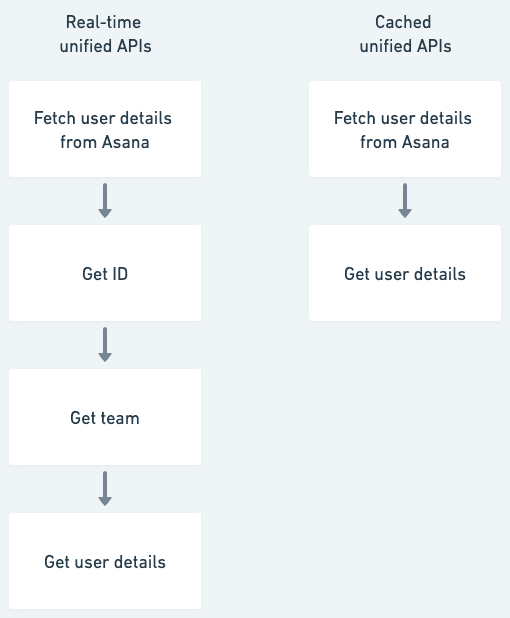
Limited querying and filtering: Complex queries may necessitate multiple API calls and data processing, creating additional steps to retrieve the required information. For instance, when fetching a list of users from Asana, you must first obtain the ID, then the team, and finally the user. This process involves navigating through multiple hoops to access the desired data.
! Real-time unified APIs vs. cached unified APIs
Real-time unified APIs vs. cached unified APIs
How cached unified APIs work
Cached unified APIs work by storing data fetched at periodic intervals in a database. The sync frequency can be adjusted to suit your use case.
A note on the real-time feature in cached unified APIs
While cached APIs may offer webhooks to simulate real-time updates, there is a time gap between the data entering your customer's system (say, Asana), the webhook relaying new data, and your scheduling infrastructure updating the data in your system. Moreover, not all the apps out there provide webhooks, and even the ones that do may not send events for the things you might be interested in.
Pros
Advanced filtering
Access to all data enables direct access to specific information without following a sequence of API calls. The cached Unified API providers build an API on top of the database that caches the data.
Overcome rate limits by the underlying APIs
Since the data is stored by the unified API provider, you do not have to worry about the rate limits of the underlying APIs.
Tradeoffs
-
Need for scheduling infrastructure
Setting up scheduling infrastructure is necessary to fetch data. When the scheduling infrastructure is handled by the unified API provider, there is a need to move to costlier pricing tiers to get higher sync intervals. -
Data storage and privacy
Customer data is stored with the unified API provider. -
Compromise on real-time data
The data fetched is not truly real-time, which may or may not be a disadvantage depending on your use case.
The ETL-free alternative: declarative pass-through pipelines
There is a third architectural pattern that does not fit neatly into the real-time vs. cached binary: declarative pass-through sync. Instead of landing your customers' SaaS data in a warehouse before forwarding it to your application (the warehouse ETL + reverse ETL path), a pass-through pipeline streams data directly from the source API into your own datastore. No intermediate storage. No transformation layer running in a warehouse you have to govern.
A declarative data sync pipeline defines what data to fetch - which resources, which fields, in what order - without procedural code for HTTP calls, pagination, authentication, or error handling. The pipeline runtime handles all of that generically. This makes it an ETL-free data sync strategy purpose-built for embedded B2B SaaS integration.
To be clear: this is not about replacing data warehouses for analytics. If your data team needs cross-customer dashboards or ML training sets, a warehouse is the right tool. But if your product simply needs to pull your customer's tickets, contacts, or employees into your own database for operational use, the double-ETL path (warehouse ingest + reverse ETL back out) adds cost, latency, and compliance surface that a pass-through pipeline avoids entirely.
Decision matrix: architecture trade-offs
The table below compares three common architectures for syncing third-party SaaS data into your application. Use it to anchor the conversation with your engineering and security teams.
| Factor | Declarative pass-through | Warehouse ETL + reverse ETL | Cached unified API |
|---|---|---|---|
| Data freshness | Near real-time (webhook) or scheduled (minutes to hours) | Batch - typically 15-60 min ingest + transformation delay | Periodic cache refresh, provider-controlled intervals |
| Bidirectional writes | Supported via real-time unified API writes; conflict resolution is application-level | Reverse ETL handles outbound; inbound is a separate pipeline | Limited - most cached providers are read-heavy |
| Intermediate data storage | None - data flows through in memory, only sync metadata persists | Warehouse stores a full copy of customer data | Provider stores a full copy of customer data |
| Compliance surface (GDPR, SOC 2) | Minimal - no intermediate data processor to govern | Warehouse becomes a data processor; requires DPAs, retention policies, DSAR procedures | Provider is a data processor; review their sub-processor list |
| Querying & filtering | Depends on your own datastore schema | Full SQL power in the warehouse | Provider-built API on cached data; advanced filtering |
| Rate limit handling | Pipeline handles backoff and retry; your app still bound by source API limits | Decoupled - warehouse absorbs the load; app queries the warehouse | Provider absorbs all rate limits |
| Bulk/historical extraction | Works but requires careful checkpoint management for large backfills | Purpose-built for bulk; warehouse handles scale natively | Handled by provider's sync infrastructure |
| Ongoing engineering cost | Low - config-driven; no per-connector code | High - orchestration (Airflow/dbt), warehouse compute, reverse ETL tool | Low if provider covers your integrations |
| Vendor lock-in | Config is portable if based on open formats (JSON/JSONata) | Heavy - tied to warehouse + orchestrator + reverse ETL vendor | Medium - normalized schema may not transfer |
Sample TCO and latency scenarios
The numbers below are illustrative, built from industry benchmarks. Use them as starting points for your own spreadsheet, not as guarantees.
Scenario 1: Early-stage SaaS, 5 integrations, 200 customers
You need CRM and ticketing data flowing into your product. Each customer connects one or two accounts.
| Cost line | Declarative pass-through | Warehouse ETL + reverse ETL |
|---|---|---|
| Integration platform | ~$500-1,500/mo (unified API) | ~$1,000-2,000/mo (ELT tool) |
| Warehouse compute | $0 | ~$500-1,500/mo |
| Reverse ETL tool | $0 | ~$500-1,000/mo |
| Engineering maintenance | ~5 hrs/mo (config tweaks) | ~20-40 hrs/mo (pipeline monitoring, dbt models, orchestration) |
| Estimated monthly total | ~$1,000-2,500 | ~$4,000-8,500 |
| Typical end-to-end latency | 1-15 minutes | 30-90 minutes |
At this stage, the warehouse path roughly doubles your integration spend with no proportional benefit for operational data use cases.
Scenario 2: Growth-stage SaaS, 15 integrations, 1,000 customers
You have HRIS, CRM, ATS, and ticketing categories. Some customers have 50K+ records.
| Cost line | Declarative pass-through | Warehouse ETL + reverse ETL |
|---|---|---|
| Integration platform | ~$2,000-4,000/mo | ~$3,000-5,000/mo (ELT tool, higher MAR tier) |
| Warehouse compute | $0 | ~$2,000-5,000/mo |
| Reverse ETL tool | $0 | ~$1,500-3,000/mo |
| Engineering headcount | ~0.25 FTE | ~0.5-1 FTE |
| GDPR compliance overhead | Minimal (no intermediate store) | DPAs, retention policies, DSAR procedures for warehouse |
| Estimated monthly total | ~$5,000-8,000 | ~$12,000-25,000+ |
| Typical end-to-end latency | 5-30 minutes | 45 minutes - 2 hours |
The compliance gap widens here. Every intermediate data store becomes a data processor under GDPR, requiring data processing agreements, retention policies, and deletion procedures for a system that exists purely as plumbing.
Scenario 3: Enterprise SaaS with regulated data (healthcare, fintech)
You are handling employee PII or financial data. Your customers require SOC 2 Type II and single-tenant isolation.
| Cost line | Declarative pass-through | Warehouse ETL + reverse ETL |
|---|---|---|
| Integration platform | ~$4,000-8,000/mo | ~$5,000-8,000/mo |
| Warehouse (single-tenant) | $0 | ~$5,000-15,000/mo |
| Reverse ETL | $0 | ~$3,000-5,000/mo |
| Compliance & audit | Lower surface area; fewer sub-processors to document | Full DPIAs for warehouse processing; vendor risk assessments at ~$1,000-5,000 per vendor |
| Estimated monthly total | ~$6,000-12,000 | ~$18,000-40,000+ |
For regulated data, every intermediate storage layer is a liability. GDPR fines can reach up to 4% of annual worldwide turnover, and healthcare data breaches cost approximately $7.42 million per incident on average. A pass-through architecture that retains zero customer data after delivery removes an entire class of risk from your compliance posture.
Scenario 4: Analytics-heavy product needing cross-customer aggregation
Your product builds dashboards that aggregate data across a customer's multiple SaaS tools.
| Cost line | Declarative pass-through | Warehouse ETL + reverse ETL |
|---|---|---|
| Fit | Poor - pass-through delivers to your DB, but cross-source joins require you to build the query layer | Strong - warehouse is designed for analytical queries across large datasets |
This is the scenario where a warehouse earns its keep. If your product's core value depends on SQL-level ad-hoc querying across multiple data sources, pay for the warehouse. A pass-through pipeline is the wrong tool here.
Worked example: what a 15-minute freshness SLA actually costs
Concrete numbers help stakeholders make trade decisions faster than tables of ranges. Take a product that commits to a 15-minute freshness SLA for support tickets pulled from Zendesk and Freshdesk, with 300 customers, an average of 20K tickets each, and roughly 5% daily churn (creates + updates).
Warehouse ETL + reverse ETL path. A 15-minute ingest cadence into the warehouse means 96 sync runs per day per source connector. 300 customers x 20K records x 5% daily churn = 300K modified rows per day, or roughly 9M monthly active records (MAR). That lands you in the mid-tier of most ELT vendors at $2,000-4,000/mo for the ingest connector alone. Add warehouse compute for 96 daily transformation runs and a reverse ETL job to push cleaned data back into your operational DB. Total: $6,000-10,000/mo before engineering time. End-to-end latency: 20-45 minutes typical, occasionally 60+ under load because each hop (extract, transform, reverse ETL) adds its own queue.
Declarative pass-through path. The same 15-minute cadence runs directly from source APIs into your operational database. No intermediate store, no reverse ETL. Cost is dominated by the unified API subscription (roughly $2,000-4,000/mo at this scale) plus your existing DB. End-to-end latency: 15-20 minutes, bounded by the sync interval itself.
The headline freshness gap looks small on paper (20 vs. 40 minutes), but it compounds. Every intermediate hop adds a failure mode. A stalled dbt model or a reverse ETL rate-limit hiccup extends the tail latency in ways that a direct sync does not, and you pay for the privilege.
Migration checklist: warehouse ETL to declarative pass-through
Teams moving to a no-ETL data pipeline for SaaS integrations tend to underestimate the change management, not the technical work. The technical migration is mostly config; the harder part is separating operational flows from analytical ones and cutting over stakeholders cleanly. Here is a phased checklist for SaaS declarative data synchronization migrations.
Phase 0: Assess fit before you commit
- Inventory current data flows. List every source, every destination, and the actual consumer of each dataset. Flag which flows serve operational product features vs. analytics.
- Segment operational vs. analytical data. Only migrate the operational flows. Leave the analytics pipeline alone - the warehouse still earns its keep for cross-customer reporting.
- Confirm freshness requirements. If your product SLA is 15-minute freshness and your current warehouse round-trip is 60-90 minutes, quantify the gap and the customer impact.
- Compliance impact. Document which intermediate stores you eliminate and what falls out of scope for DPAs, sub-processors, and DSAR procedures.
- Cost baseline. Capture current spend across ELT tool, warehouse compute, reverse ETL, and engineering hours. This is the number the migration must beat.
Phase 1: Pilot one high-value flow
- Pick one flow with clear operational value and moderate volume. CRM contacts or support tickets are common starting points; avoid regulated data or bidirectional flows on the first pilot.
- Configure the declarative pipeline for that one resource. Sync into a separate table or schema in your operational DB so nothing production-critical depends on it yet.
- Run the new pipeline in shadow mode alongside the existing warehouse path for 2-4 weeks.
- Diff records daily. Log discrepancies and categorize them: source API changes, transformation differences, or timing gaps. Most discrepancies come from the last category.
Phase 2: Dual-write and validate
- Point non-critical read paths (internal admin dashboards, support tools) at the new operational table first.
- Keep the warehouse path running. If the new pipeline breaks, you fall back cleanly.
- Add monitoring: sync success rate, records per sync, error categorization by source and status code, staleness alerts on the last-successful-sync timestamp.
- Validate write paths separately. Confirm that idempotent upserts against the source API succeed without duplicates under retry.
Phase 3: Cutover critical paths
- Move production read paths one at a time. Never cutover multiple flows in the same week.
- Communicate the freshness change with stakeholders (usually improvement, occasionally a regression during transition on specific edge fields).
- Keep the warehouse copy as a read-only backup for 30 days post-cutover.
Phase 4: Decommission and reclaim spend
- Turn off the reverse ETL job for the migrated flow.
- Drop the intermediate warehouse tables that no longer serve analytics.
- Remove the ELT connector for that source if analytics does not depend on it. If analytics still needs it, downgrade the sync frequency to what the analytical use case actually requires.
- Update your data map, DPAs, and sub-processor list. Notify Security and Compliance.
- Reconcile actual monthly spend against the baseline. Feed the delta back into the pilot business case for the next flow.
Most teams get through Phase 0-2 in 4-6 weeks per flow. The real accelerator is disciplined scope: one flow at a time, no bundling migrations with feature work.
Best unified API for shipping integrations fast: vendor comparison
If you are a startup evaluating unified API providers in 2026, the usual shortlist looks like Merge, Codat, Finch, Alloy, and Truto. The deciding factors when the goal is to ship fast are almost always the same three: time-to-first-integration, hidden costs that show up at scale, and developer experience.
Time-to-first-integration matrix (dev hours)
The ranges below are conservative estimates for a greenfield implementation covering one category (CRM, HRIS, or ticketing), OAuth setup, one or two resource endpoints, and a working end-to-end flow into production. They assume a competent full-stack engineer who has not used the vendor before. Your mileage will vary with team familiarity and how much custom UI you build around the vendor's Link widget.
| Vendor | Category focus | Dev hours to first integration | Pass-through / real-time support | Prebuilt account-linking UI |
|---|---|---|---|---|
| Merge | HRIS, ATS, CRM, ticketing, accounting, file storage | 16-40 hrs | Cached-first; pass-through is limited | Yes (Merge Link) |
| Codat | Accounting, banking, commerce | 20-40 hrs | Cached-first | Yes (hosted Link) |
| Finch | HRIS, payroll | 16-40 hrs | Mix of API-based and assisted providers; cached | Yes (Finch Connect) |
| Alloy | Identity, KYC/KYB workflows | 24-40 hrs | Real-time verification calls | Yes (workflow UI) |
| Truto | HRIS, CRM, ATS, ticketing, accounting, PMS, commerce | 8-24 hrs | Real-time by default; pass-through via Daemon or RapidBridge | Yes (Truto Link + typed SDKs) |
Vendor UX matters more than most teams expect. A drop-in Link/Connect widget removes four to eight hours of custom OAuth UI work per category. Typed SDKs shave another chunk off the initial integration by handling auth, retries, and pagination for you. Docs quality (working sample repos that clone-and-run) is the third multiplier - a good starter template is worth a day of setup.
Hidden cost & scaling notes per vendor
The sticker price on a unified API is rarely the total cost. The line items that surprise teams as they scale:
- Initial historical sync API calls - Cached providers pull a full backfill of every connected account on first sync. A CRM with 500K contacts across 200 customers is 100M records of extraction on day one. Some vendors count these against your monthly-active-record (MAR) or sync-event quotas, which can push you into a higher tier immediately after onboarding a single enterprise customer.
- MAR-based or connection-based pricing inflation - Pricing that scales linearly with records or connections punishes success. One large HRIS or CRM customer can consume the equivalent quota of hundreds of SMB accounts. Model this before signing an annual contract.
- Sync frequency gating - Faster sync intervals (5-minute vs. hourly) are usually locked behind higher tiers on cached providers. If your product promises 15-minute freshness for support tickets, budget for the tier that supports it, not the entry tier.
- Custom fields, custom objects, and write endpoints - Many vendors gate custom object support, write endpoints, or non-standard resources behind enterprise plans. Verify that the fields and endpoints you actually need are included in the tier you plan to buy, not on the roadmap.
- Sub-processor and DPA overhead - Every cached provider stores customer data, which makes them a data processor under GDPR. Expect security review time, DPA negotiation, and sub-processor list updates on every new enterprise contract. Pass-through and real-time architectures avoid this because no customer data is persisted with the vendor.
- Rate limit passthrough vs. absorption - Real-time providers pass upstream rate limits to your app. Cached providers absorb them but at the cost of freshness and higher pricing tiers. Neither is free; the question is where you want the constraint to live.
- Support tiers - Response-time SLAs, dedicated Slack channels, and connector customization help are often bundled only into enterprise plans. Factor this in if your integration surface is business-critical.
Developer experience highlights (SDKs, Link, docs quality)
For a startup optimizing purely for time-to-first-integration, the DX checklist is short and worth grading vendors on before you commit:
- Hosted account-linking widget - A drop-in widget (Merge Link, Finch Connect, Codat Link, Truto Link) removes the need to build OAuth screens per provider. This is the single largest DX accelerator, worth days of engineering per category.
- Typed SDKs in your stack - First-class TypeScript and Python SDKs with generated types catch schema mismatches at compile time. Ruby, Go, Java, and PHP coverage varies widely; check the specific language and framework you plan to use.
- Sandbox accounts with realistic data - Testing OAuth flows against real provider sandboxes (Salesforce Developer Edition, HubSpot test accounts, workday test tenants) is painful to set up manually. Vendors that ship prepopulated sandbox connections or partner accounts cut days off the initial development loop.
- Copy-paste examples that run - Docs quality varies wildly across providers. The signal to look for: can you clone a working sample repo, plug in an API key, and see data flowing in 30 minutes? If not, expect the getting-started phase to stretch.
- Webhook infrastructure - Native webhook forwarding (both from source providers to the unified API, and from the unified API to your endpoints) saves you from building a webhook receiver, deduper, and retry queue. Check for signature verification and delivery retries with exponential backoff.
- Override hierarchies for per-customer config - Real production integrations need per-customer field mappings, custom endpoints, and conditional transforms. Vendors that expose a config override system (per-account overrides on top of per-tenant defaults) let you handle enterprise customer requests without shipping a code release.
- Observability into sync jobs - A dashboard that shows sync history, error rates, last successful pull per resource, and retry status is table stakes. Vendors that only expose this via API force you to build the ops surface yourself.
For a startup targeting fastest possible shipping: pick the vendor whose Link widget and SDK match your stack, whose sandbox accounts are ready-to-use, and whose pricing model does not punish you for onboarding your first large customer. If you also need pass-through or real-time (no vendor-side storage), narrow the list further - most cached-first vendors will not fit that constraint cleanly.
When to avoid pass-through declarative pipelines
Declarative sync pipelines are not a universal answer. Skip them when:
-
Complex bidirectional sync with conflict resolution - If two systems can modify the same record simultaneously, you need application-level conflict resolution logic that goes beyond what a declarative config can express. Think CRM field-level merge rules or inventory count reconciliation.
-
Sub-second event-driven workflows - If you need to react to a webhook event within milliseconds (fraud detection, real-time pricing), a scheduled sync pipeline is too slow. Use webhooks paired with a real-time unified API instead.
-
Bulk historical extraction at warehouse scale - Backfilling 50 million rows from a customer's Salesforce instance is a job for a purpose-built ELT tool with native CDC support. A pass-through pipeline handles incremental syncs well, but initial bulk loads at massive scale will test its limits.
-
Cross-source analytical joins - If you need to JOIN a customer's HubSpot contacts with their Zendesk tickets and their Stripe invoices in a single SQL query, you need a warehouse. Pass-through delivers data to your operational database, but it is not an analytics engine.
-
Radically different per-customer transformation logic - If every customer needs a fundamentally different transformation pipeline (not just different field mappings, but different processing graphs), a code-based orchestrator like Airflow or Dagster gives you more flexibility. That said, declarative transforms with JSONata handle more customization than most teams expect - per-customer field mappings, conditional logic, and computed fields are all expressible in config.
Recommendations for hybrid patterns (partial writeback)
Most real-world architectures end up as hybrids. Here are patterns that work well:
Pattern 1: Pass-through reads, real-time API writes
The most common pattern for B2B SaaS. Use a declarative sync pipeline to pull data from your customers' SaaS accounts into your operational database on a schedule (every 15 minutes, every hour). When your application needs to write back - creating a contact, updating a ticket status, pushing a lead score - make a direct write through the real-time unified API.
This avoids the latency of a reverse ETL batch job for writes while still giving you structured, queryable data locally. The real-time API handles OAuth, rate limiting, and field mapping on the write path. Your application owns the conflict resolution logic because it knows the business context.
sequenceDiagram
  participant App as Your App
  participant DB as Operational DB
  participant Pipeline as Pass-through Pipeline
  participant UAPI as Unified API
  participant SaaS as "Customer SaaS (CRM)"

  Note over Pipeline,SaaS: Scheduled read path
  Pipeline->>UAPI: Fetch resources (paginated)
  UAPI->>SaaS: GET /contacts, /accounts
  SaaS-->>UAPI: Records
  UAPI-->>Pipeline: Normalized records
  Pipeline->>DB: Upsert into operational tables

  Note over App,SaaS: On-demand write path
  App->>DB: Read local record
  DB-->>App: Record + external_id
  App->>UAPI: PATCH contact (lead_score only)
  UAPI->>SaaS: PATCH /contacts/:id
  SaaS-->>UAPI: 200 OK
  UAPI-->>App: Ack
Pattern 2: Declarative sync for operational data, warehouse for analytics
Run pass-through pipelines for the data your product needs operationally - employee records, CRM contacts, support tickets. Separately, run a traditional ELT pipeline into a warehouse for the data your analytics team needs for cross-customer reporting, churn models, or usage dashboards.
The key insight: these two data paths serve different consumers with different freshness and query requirements. Forcing both through a single warehouse path over-engineers the operational use case and under-serves the analytical one.
flowchart LR
  subgraph src ["Customer SaaS apps"]
    S1[CRM]
    S2[HRIS]
    S3[Ticketing]
  end
  subgraph op ["Operational path (product features)"]
    PT["Pass-through<br>pipeline"]
    ODB[("Operational DB")]
    APP["Product<br>application"]
  end
  subgraph an ["Analytical path (BI, ML)"]
    ELT["ELT connector"]
    WH[("Warehouse")]
    BI["Dashboards<br>and models"]
  end
  S1 --> PT
  S2 --> PT
  S3 --> PT
  PT --> ODB
  ODB --> APP
  APP -->|"writes via real-time API"| S1
  S1 --> ELT
  S2 --> ELT
  S3 --> ELT
  ELT --> WH
  WH --> BI
Each path is sized for its consumer. Operational sync runs every 15 minutes into your DB; analytical ELT can run hourly or daily into the warehouse. Neither path pays the tax of the other's requirements.
Pattern 3: Selective writeback with override mappings
For products that need partial bidirectional sync - reading most data but writing back a subset of fields - use a declarative pipeline with per-resource write mappings. Define which fields your application is the source of truth for, and sync only those fields back. The unified API's override hierarchy lets you customize write mappings per customer or even per connected account without code changes.
This pattern works well for scenarios like: pushing a computed lead score back into a CRM, updating a custom field with your product's output, or syncing task status between your app and a project management tool.
Idempotent upsert with lookup-before-write. The safest write pattern is to look up the target record by a stable external identifier before deciding whether to create or update. This keeps retries safe and prevents duplicates when the network drops between your write and the ack.
// Idempotent upsert of a lead score into a customer's CRM
async function writeLeadScore(client, { externalId, email, leadScore }) {
  // 1) Look up by a stable key you control
  const existing = await client.crm.contacts.list({
    filter: { external_id: externalId },
    limit: 1,
  });

  // 2) Update only the fields your app owns
  if (existing.data.length > 0) {
    return client.crm.contacts.update(existing.data[0].id, {
      lead_score: leadScore,
      lead_score_updated_at: new Date().toISOString(),
    });
  }

  // 3) Create with the same external_id so future retries find it
  return client.crm.contacts.create({
    external_id: externalId,
    email,
    lead_score: leadScore,
    lead_score_updated_at: new Date().toISOString(),
  });
}
Three things make this idempotent: (1) the lookup uses an identifier your app controls, not one the source system assigns; (2) the update touches only fields your app is the source of truth for, so it never clobbers user edits in other fields; (3) the create carries the same external_id, so a retried request after a partial failure finds the record instead of duplicating it.
Conflict resolution with an ownership map. When both your app and the customer's SaaS tool can write the same field, encode ownership explicitly. The simplest rule that works in production: field-level ownership plus a timestamp guard.
// Field ownership map: who wins for each writable field
const OWNERSHIP = {
  lead_score: 'app',            // your app is source of truth
  lifecycle_stage: 'app',       // your app is source of truth
  phone: 'source',              // customer's CRM wins
  email: 'source',              // customer's CRM wins
  notes: 'last_write_wins',     // most recent update wins
};

async function reconcile(local, remote) {
  const patch = {};

  for (const [field, owner] of Object.entries(OWNERSHIP)) {
    if (owner === 'app') {
      if (local[field] !== remote[field]) patch[field] = local[field];
    } else if (owner === 'last_write_wins') {
      const localTs = local.updated_at?.[field] ?? 0;
      const remoteTs = remote.updated_at?.[field] ?? 0;
      if (localTs > remoteTs) patch[field] = local[field];
    }
    // owner === 'source' -> never write from app to source
  }

  return Object.keys(patch).length ? patch : null;
}
Guardrails to add before this hits production:
- Idempotency keys on writes. If the unified API supports an idempotency header, set it to a hash of
(external_id, field_set, source_updated_at). Retries then dedupe at the API layer. - Optimistic concurrency where the source supports it. If the source API returns an
If-Matchor version token, thread it through your write. On conflict, refetch, reapply your ownership map, and retry. - Dead-letter queue for permanent write failures. A rejected write (4xx that is not a rate limit or a stale version) should land in a queue a human can inspect, not silently drop.
- Rate-limit-aware retry. Exponential backoff with jitter on 429s, capped at the source API's advertised retry-after. Your pipeline runtime should handle this generically; verify it does.
The right architecture depends on your data's destination, not its source. If data flows into your product's operational database, a declarative pass-through pipeline is almost always cheaper, faster, and easier to govern than a warehouse round-trip. If data flows into analytical models, the warehouse earns its complexity.
Truto's Approach
At Truto, we prioritize flexibility and offer four options for our customers:
Real-time unified API
Truto's default option, providing real-time data without storing customer data, is ideal for just-in-time data needs.
Sync to your database with Truto Daemon
Fetch and store data from our unified APIs in your database, enabling advanced querying and filtering while maintaining data privacy.
The Daemon runs within your VPC or cloud infrastructure and just uses the same real-time Unified API that is available to all of our customers. The code is open-source on GitHub too.
Sync data with Truto RapidBridge
In case you don't want to maintain or run the Daemon in your infrastructure, Truto also provides RapidBridge solution which fetches the data from the Unified APIs and sends it to you via a webhook endpoint. This means that you don't have to maintain a scheduling infrastructure to fetch the data periodically.
Fetch from our database with Truto SuperQuery
Retrieve data stored in our database, allowing richer querying and filtering without the need to manage your databases. Choose between single-tenant or multi-tenant instances as per your requirements.
Understanding the nuances of real-time and cached unified APIs empowers product and engineering managers to select the most suitable approach for their specific data access needs. Choose wisely, considering factors like data freshness, privacy, querying capabilities, and the necessity for scheduling infrastructure.
FAQ
- What is a declarative data sync pipeline?
- A declarative data sync pipeline defines what data to fetch - which resources, fields, and order - without procedural code for HTTP calls, pagination, or authentication. The pipeline runtime handles execution generically, making it an ETL-free approach to SaaS data synchronization.
- When should I use a warehouse ETL pipeline instead of a pass-through sync?
- Use a warehouse ETL pipeline when you need cross-source analytical joins (e.g., joining CRM contacts with billing data in SQL), bulk historical extraction at massive scale, or when your product's core value depends on ad-hoc querying across multiple data sources.
- What are the compliance advantages of pass-through pipelines over cached or warehouse-based approaches?
- Pass-through pipelines retain zero customer data after delivery - only sync metadata persists. This eliminates the intermediate data store that would otherwise become a data processor under GDPR, requiring data processing agreements, retention policies, and data subject access request procedures.
- Can I use both pass-through sync and a warehouse together?
- Yes. A common hybrid pattern uses declarative pass-through pipelines for operational data your product needs (contacts, tickets, employees) and a separate ELT pipeline into a warehouse for analytics, reporting, and ML workloads. Each path serves different consumers with different requirements.
- What is the cost difference between declarative pass-through and warehouse ETL for SaaS integrations?
- For a growth-stage SaaS with 15 integrations and 1,000 customers, a pass-through pipeline typically costs $5,000-8,000/month versus $12,000-25,000+ for warehouse ETL plus reverse ETL. The gap widens with regulated data where compliance overhead for intermediate storage adds significant cost.