
ServiceNow Integration Guide 2026: From ITSM and HRSD to Agentic AI
A technical deep dive into integrating ServiceNow via OAuth 2.0 Client Credentials, covering HRSD, ITSM, and the 2026 Zurich release features for AI agents.


ServiceNow is the undisputed heavyweight of the enterprise world, commanding over 44% of the ITSM market. But for developers, it is often a source of immense frustration. Integrating with ServiceNow isn't just about calling an endpoint; it’s about navigating a legacy architecture of Scoped Apps, complex Access Control Lists (ACLs), and proprietary OAuth flows that vary depending on whether your instance is on the Washington DC or the 2026 Zurich release.
This guide cuts through the marketing noise to provide a technical walkthrough for setting up OAuth 2.0 Client Credentials, provisioning service users, and preparing your ServiceNow data for the shift toward Agentic AI.
Understanding the ServiceNow Ecosystem: ITSM, HRSD, CSM, and CMDB
ServiceNow isn't a single product; it's a "platform of platforms." Each module (or "app") has its own database tables, logic, and API quirks.
- ITSM (IT Service Management): The core. This is where Incidents, Problems, and Changes live. Most integrations start here to automate ticketing workflows.
- HRSD (Human Resources Service Delivery): Manages employee lifecycles. Integrating here requires higher permission tiers and specific scoped roles like
sn_hr_core.admin. - CSM (Customer Service Management): External-facing case management. It handles Cases and Entitlements for your customers' customers.
- CMDB (Configuration Management Database): The "source of truth" for IT assets. Integrating with the CMDB API is notoriously difficult due to the volume of data and complex relationships between Configuration Items (CIs).
Market Context: In 2024, ServiceNow led the ITSM market with a 44.4% share. As we move into 2026, the platform is pivoting heavily toward "Agentic AI," where autonomous agents perform tasks rather than just answering questions.
The Integration Bottleneck: Why ServiceNow is Hard to Connect
If you've integrated with Slack or Stripe, or followed our guide to Salesforce integration, ServiceNow will feel like a different era. There are three main reasons why ServiceNow integrations fail or become massive technical debt sinks:
1. ACL-Based Permissioning
ServiceNow uses Access Control Lists (ACLs), not just roles. ACLs evaluate in a four-layer funnel: roles → data conditions → reference controls → scripts. Even if your API user has a role, an ACL might still block a specific field on a specific table. Debugging "403 Forbidden" in ServiceNow is a rite of passage for integration engineers.
2. Scoped App Isolation
Modules like HRSD live in separate permission silos. Your integration user needs roles granted within each relevant scope. If your customer's admin misses a scope assignment, your integration may return a 200 OK with empty result sets—no error, just silence.
3. Semaphore-Based Rate Limiting
Unlike most SaaS APIs with clear "requests per minute" buckets, ServiceNow performance is governed by semaphores—internal controls that manage concurrent transactions. High-volume syncs can trigger rate limits that throttle requests based on instance load. Note that rate limit counters are committed to the database every 30 seconds, meaning you can blow past limits in burst scenarios before getting rejected with a 429.
Step-by-Step: Configuring OAuth 2.0 Client Credentials
For machine-to-machine communication, OAuth 2.0 Client Credentials is the gold standard. It avoids the need for a user to manually log in via a browser, making it ideal for background syncs and AI agents. However, ServiceNow blocks this flow by default.
Phase 1: Prerequisites and Global Enablement
Ensure the following plugins are active: OAuth 2.0, REST API Provider, and Authentication Scope. Then, enable the flow globally:
- In the Filter Navigator, type
sys_properties.list.
- Search for:
glide.oauth.inbound.client.credential.grant_type.enabled.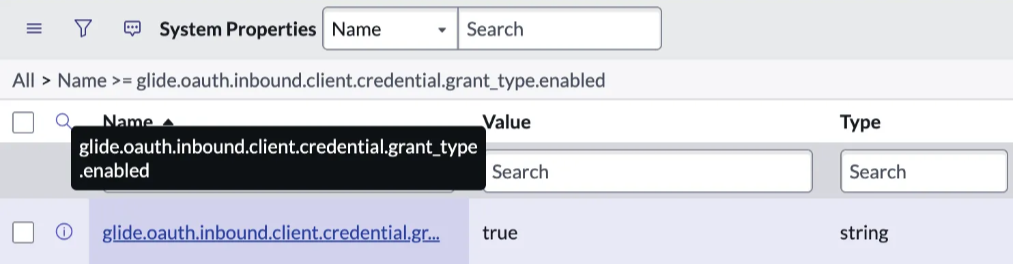
- Ensure the value is set to true.
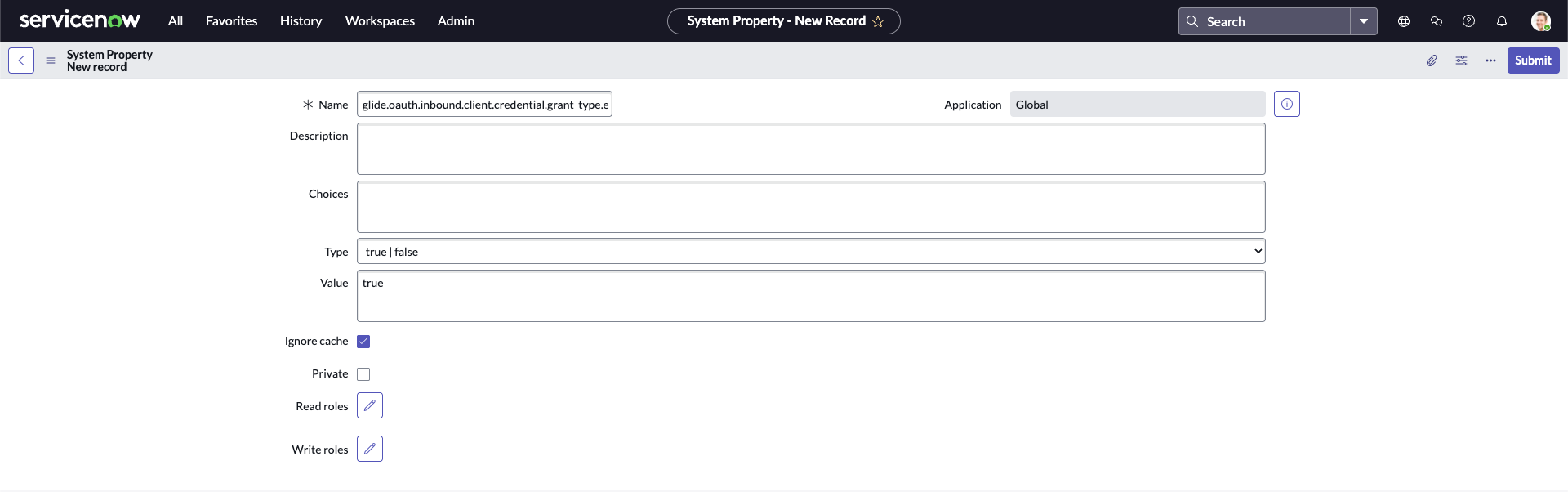
- If it doesn't exist: Click New, name it exactly that, set Type to true/false, and Value to true.



Phase 2: Provisioning the Service User
Never use a personal admin account. Create a dedicated service user:
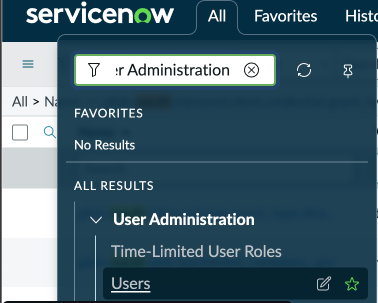
- Navigate to User Administration > Users and click New.
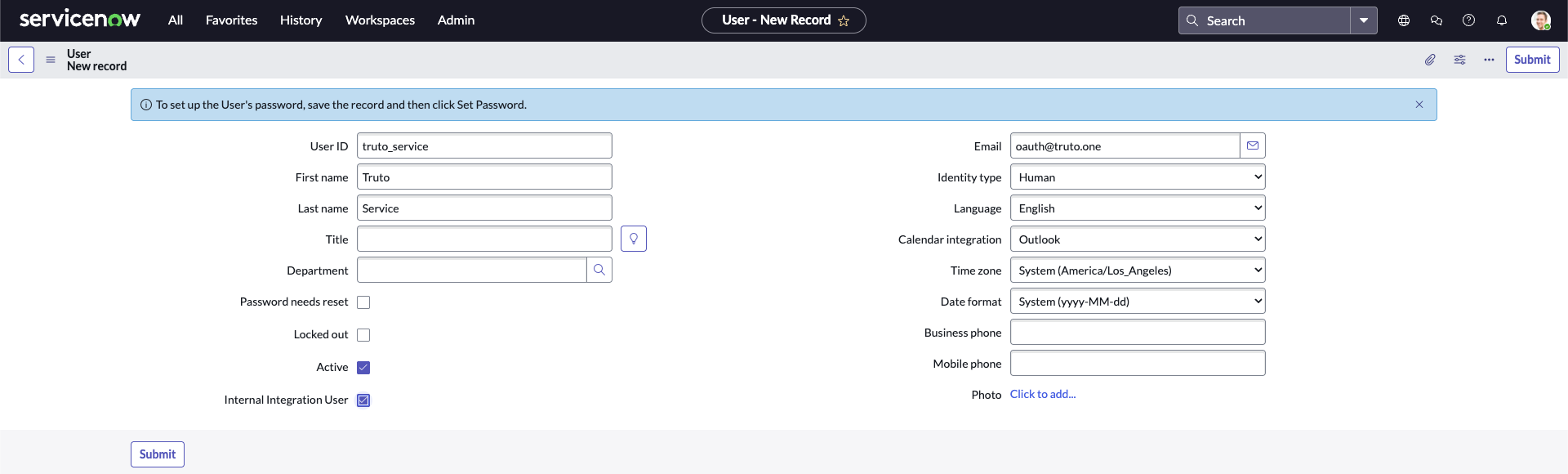
- Set the User ID to something like
truto_service. - Critical: Check the Internal Integration User box. This prevents password expiration and blocks UI logins.
- Assign Roles: You will likely need:
snc_platform_rest_api_access: Required for any REST API access.itil: For standard Incident and Task access.sn_hr_core.admin: Specifically for HRSD data syncs (requires HRSD plugin).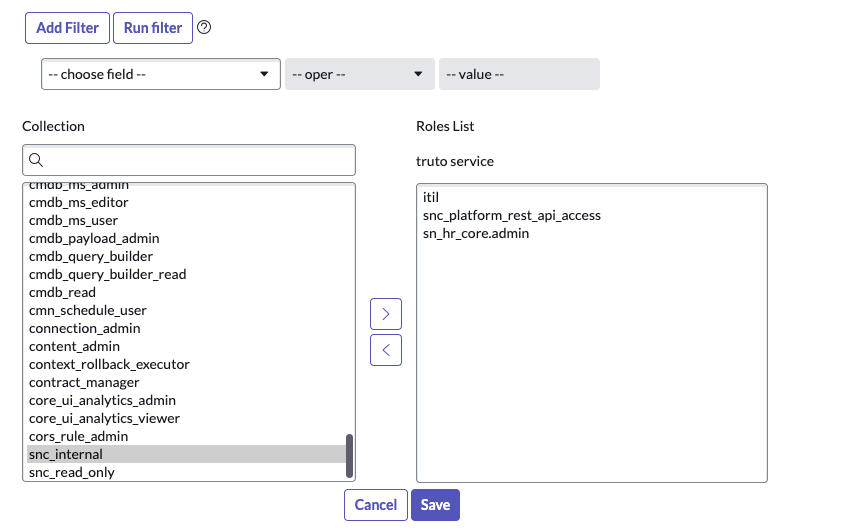


Phase 3: Create the OAuth Application Registry
The UI for this changed in the Zurich release.
For Washington DC and Older Releases:
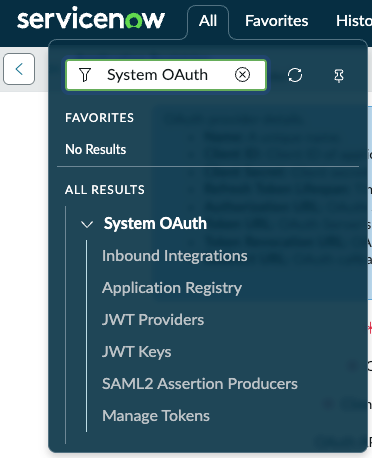
- Navigate to System OAuth > Application Registry > New > "Create an OAuth API endpoint for external clients".
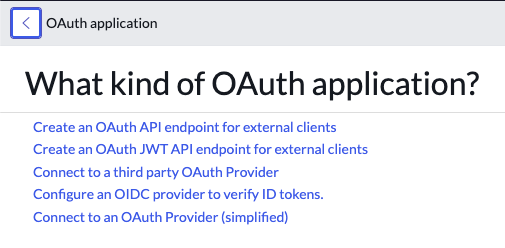
- Leave the Client Secret blank; it will auto-generate.


For Zurich Release:
- Navigate to System OAuth > Application Registry > New > New Inbound Integration Experience > OAuth - Client credentials grant.
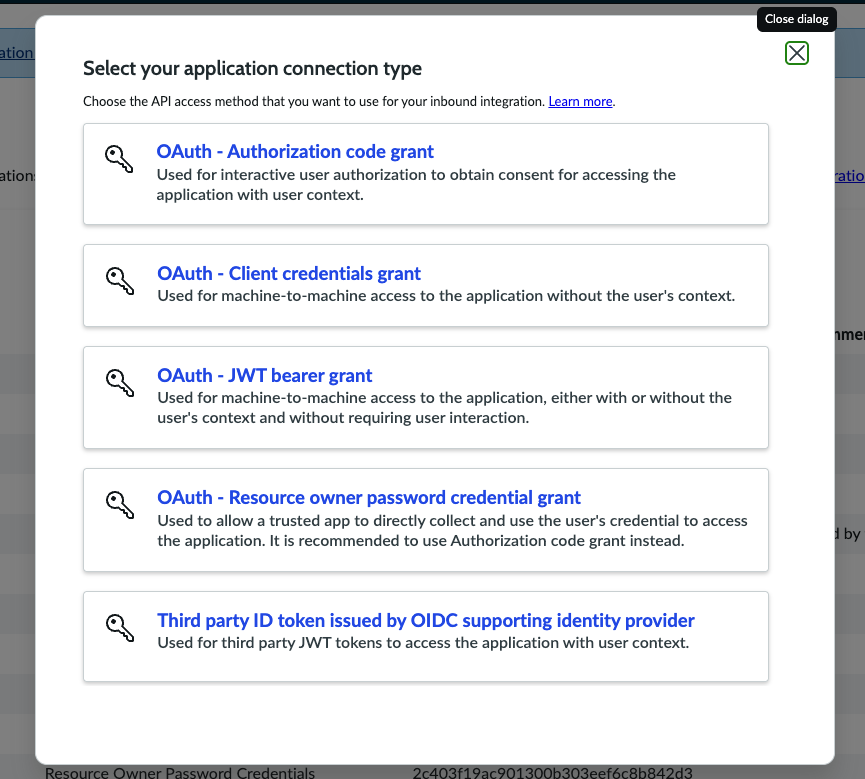

Phase 4: The "Bridge" (Most Common Failure Point)
You must link your service user to the OAuth entry. Without this, ServiceNow cannot map the token to an identity. This is a critical step in managing OAuth token lifecycles correctly within the platform.
- On the Application Registry form, find the OAuth application user field.
- If not visible, use Configure > Form Layout to add it.
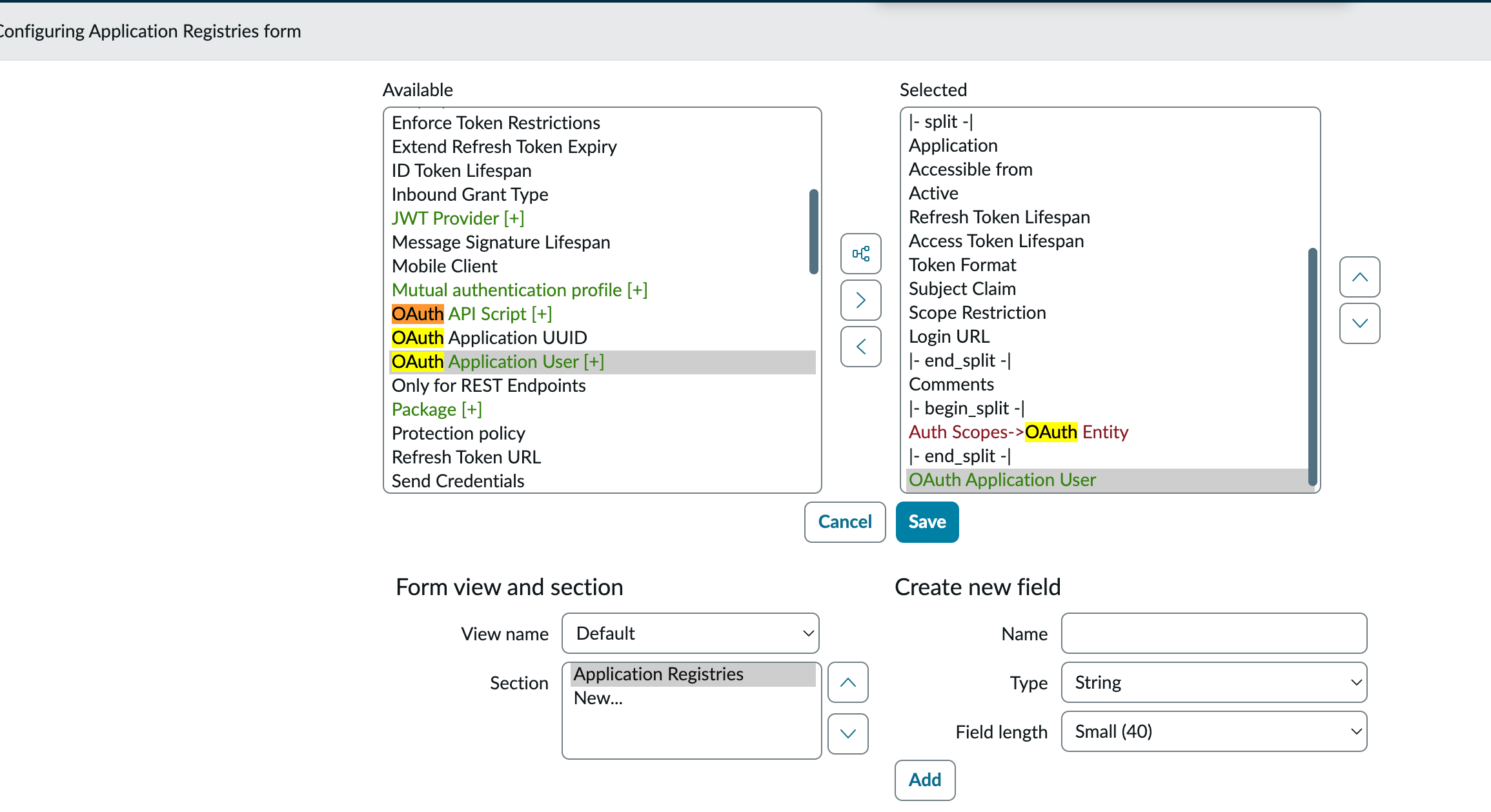
- Select your
truto_serviceuser and save.

sequenceDiagram
    participant App as Your Application
    participant SN_OAuth as SN OAuth Endpoint
    participant SN_API as SN Table API

    App->>SN_OAuth: POST /oauth_token.do (Client ID + Secret)
    SN_OAuth-->>App: Access Token (Scoped to Service User)
    App->>SN_API: GET /api/now/table/incident
    SN_API-->>App: Data JSON (Filtered by ACLs)
Advanced Strategy: Watermark-Based Sync
Offset paging is fine for small tables, but for CMDB or large Incident logs, it's a moving target. Use a watermark strategy to avoid missing records updated mid-sync:
- Track
sys_updated_on(plussys_idas a tiebreaker) as your cursor. - Query for records updated since the last cursor:
sys_updated_on > <last_time> ^ ORDERBYsys_updated_on,sys_id. - Always use
sysparm_fieldsto limit the payload. Fetching 200 fields by default is a performance killer.
Pro Tips - for Navigating ServiceNow That Will Save You Time
ServiceNow is essentially a massive relational database with a web UI. If you're building an integration, you'll spend most of your time in the Table API. Use these three shortcuts to speed up discovery:
1. The REST API Explorer
Don't guess your endpoints. ServiceNow has a built-in sandbox called the REST API Explorer. It lets you discover tables, select fields, and test queries directly in the UI.
- Path:
System Web Services > REST > REST API Explorer. - Direct URL:
https://<your-instance>.service-now.com/$restapi.do.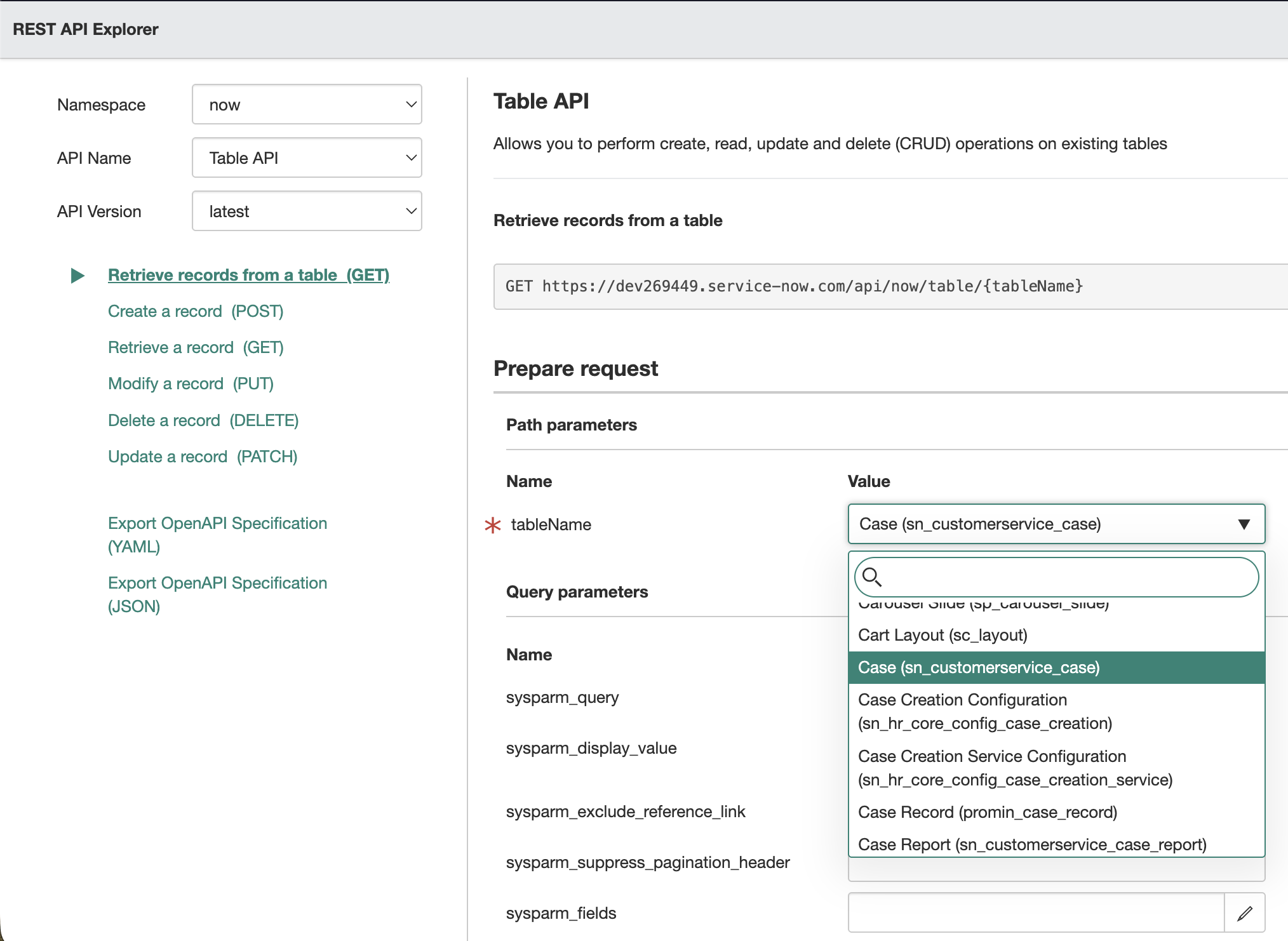

2. Schema Discovery
To find internal table names (which often differ from the UI labels) and their column types, use these modules in the Filter Navigator:
- Tables:
System Definition > Tables(The master list of every table in the system). - Tables & Columns:
System Definition > Tables & Columns(A visual tree-view of fields and relationships).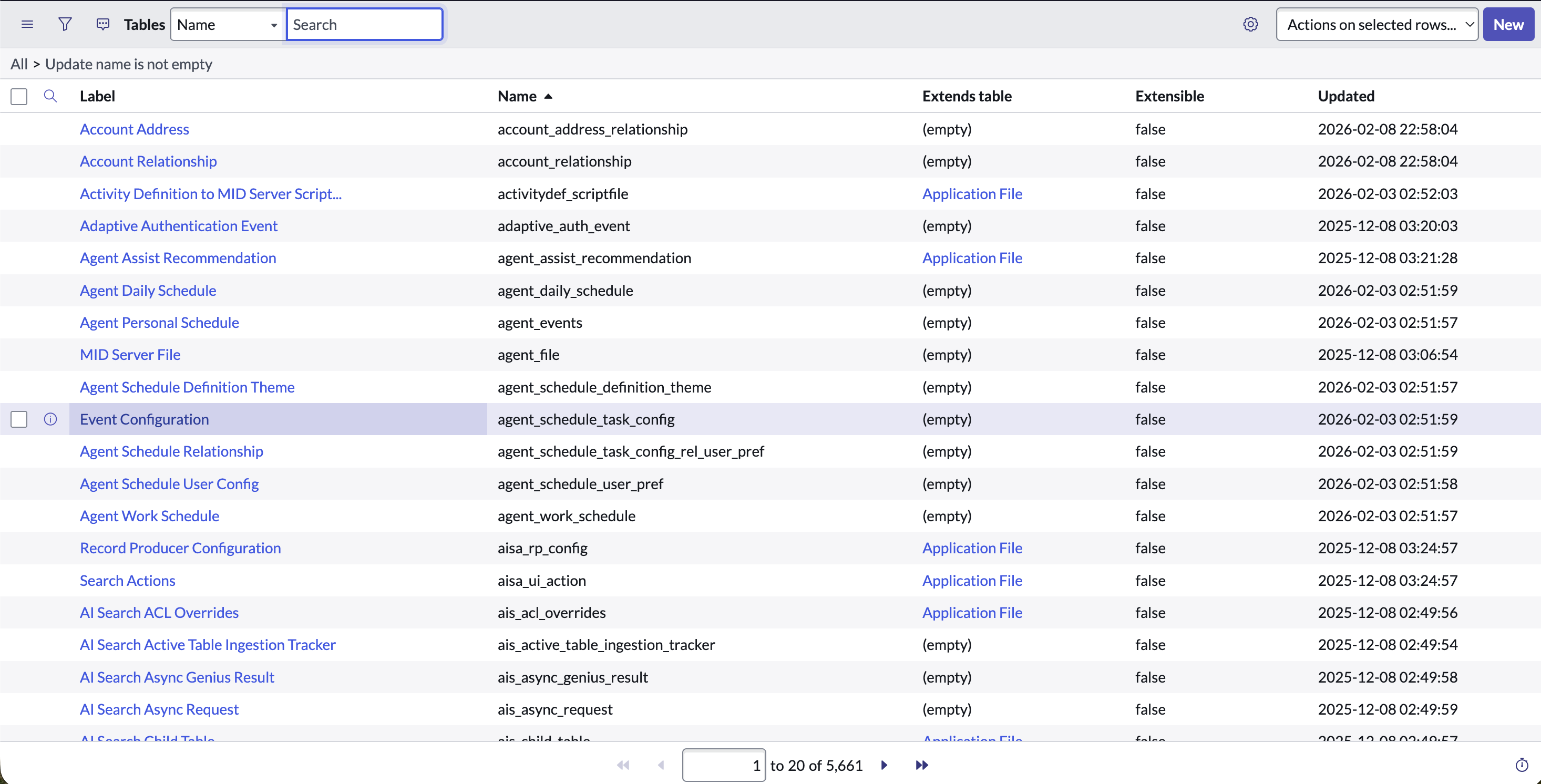

3. The ".list" Shortcut
If you need to quickly verify the data you're trying to fetch, use the Filter Navigator hack. Type <table_name>.list and hit Enter. For example, sys_user.list will immediately show you the User table. This is the fastest way to check if your API filters are actually returning the records you expect.

Preparing for the Zurich Release and Agentic AI
The industry is shifting from simple chatbots to Agentic AI—autonomous systems that use tools to complete complex tasks. Gartner predicts that by 2026, 40% of enterprise apps will include task-specific AI agents.
What Changed in Zurich?
- Agentic Playbooks: These combine automation and AI agents to finish tasks like asset lockdown or identity verification in seconds.
- Machine Identity Console: Provides centralized visibility of all service accounts. Your integration users are now auditable. If you over-provisioned with
adminroles, expect security teams to flag your integration immediately.
For an AI agent to be useful, it needs clean, structured access to data. If your agent is trying to "resolve a laptop request," it shouldn't parse raw, messy ServiceNow JSON. It needs a tool—an API endpoint that returns a normalized schema. This is where the transition from bearer tokens to enterprise auth becomes a bottleneck.
Scaling ServiceNow with Truto’s Unified API
Building a single ServiceNow connector is hard. Maintaining ten across different customer instances is a full-time job. Truto abstracts this complexity by providing a Unified API that normalizes ServiceNow data into common models.
Why use Truto for ServiceNow?
- Unified Schema Mapping: We map complex tables (like
sys_userorsn_hr_core_profile) into a consistent format. This is particularly useful when you need to pull user lists from any SaaS app without building bespoke connectors for each. - Automated Auth Management: Truto handles the OAuth handshake, token refreshes, and the specific "Bridge" user linking automatically.
- AI-Ready Toolsets: You can instantly turn ServiceNow API methods into Agent Toolsets. This allows your AI agents (using LangChain or MCP) to call ServiceNow as a simple function.
Trade-off: If you need to perform highly proprietary, non-standard ServiceNow scripting (GlideRecord operations) via API, you'll need to ensure those endpoints are exposed correctly in ServiceNow first before Truto can consume them.
Example: Fetching Normalized Incident Data
Instead of wrestling with sysparm queries, you hit a single Truto endpoint:
curl --request GET \
     --url https://api.truto.one/ticketing/tickets \
     --header 'Authorization: Bearer [YOUR_TOKEN]' \
     --header 'x-connection-id: [SERVICENOW_CONNECTION_ID]'
Strategic Wrap-up
ServiceNow is too big to ignore, but too complex to integrate casually. Whether you are syncing HR data or building an AI agent to manage IT tickets, the foundation is the same: a secure, machine-to-machine OAuth connection and a clean data model. Stop building point-to-point connectors that break every time an admin changes an ACL. Use a unified approach to ensure your integrations are as robust as the platform they connect to.
FAQ
- Why do I get access_denied even with the correct Client ID and Secret?
- Most often, this is because (1) the `glide.oauth.inbound.client.credential.grant_type.enabled` property is not set to true, or (2) the OAuth client isn’t bound to a ServiceNow user via the 'OAuth Application User' field.
- What roles are needed for a ServiceNow HRSD integration?
- At a minimum, you need `snc_platform_rest_api_access` for API connectivity and `sn_hr_core.admin` to access employee profiles within the HRSD scoped app.
- How does the ServiceNow Zurich release affect integrations?
- Zurich introduces Agentic Playbooks and a Machine Identity Console. This means your service accounts are now visible to admins in a centralized dashboard, making least-privilege access more critical than ever.
- How should I page through large ServiceNow tables reliably?
- Avoid offset paging. Use a watermark strategy with `sys_updated_on` and `sys_id` as a cursor, paired with deterministic ordering to ensure no records are missed or duplicated during sync.


