Introducing Truto Agent Toolsets
Compare Truto Agent Toolsets vs Merge Agent Handler for AI tool calling: feature matrix, buyer scenarios, migration checklist, and lock-in guidance.


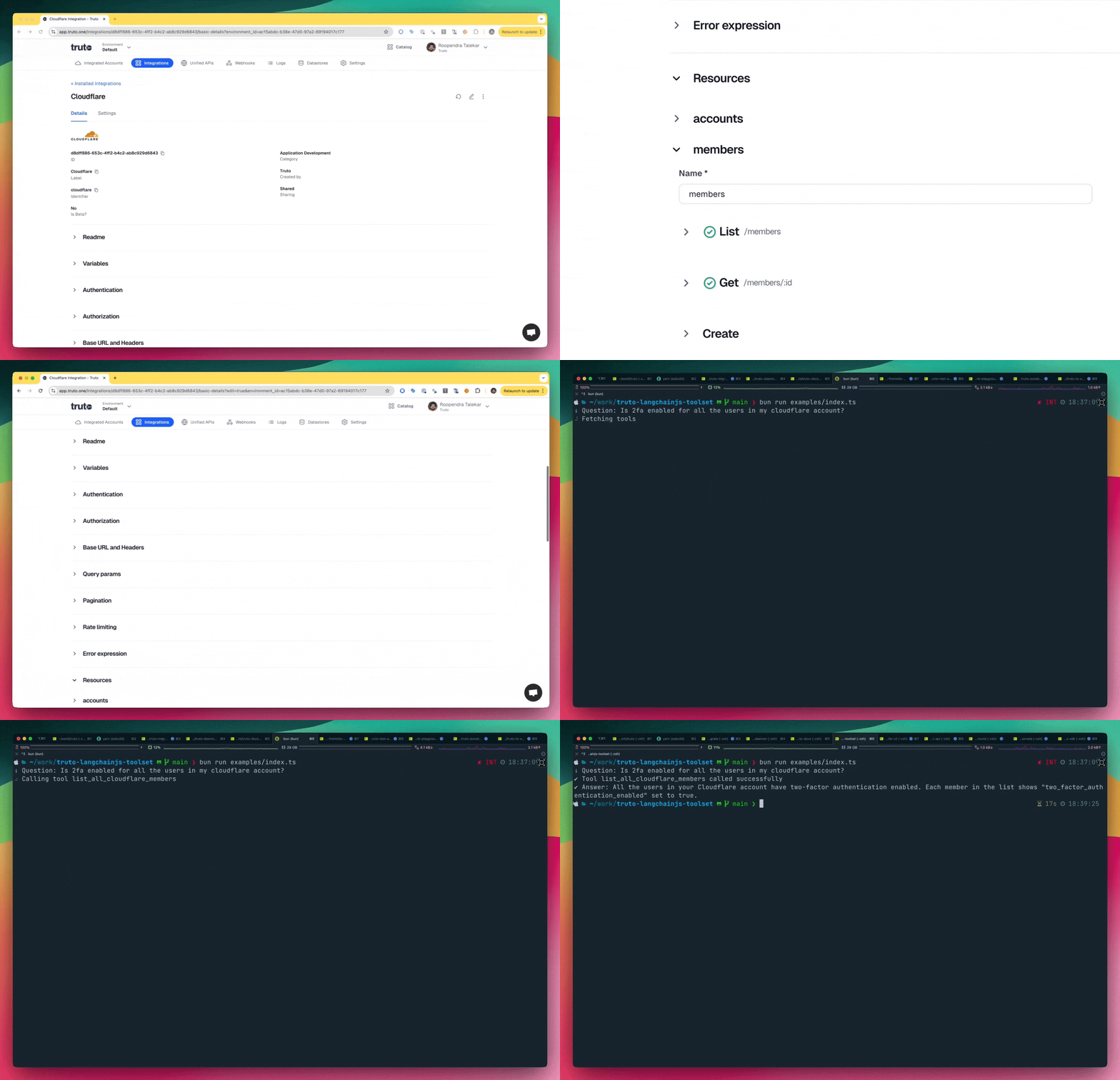
Built the True Truto Way ®️, the Truto Agent Toolset feature let you use the existing Truto Proxy APIs as tools in your LLM Agent workflows. Like everything else in Truto, these tools are fully customizable and extensible - because we believe in giving you the freedom to build integrations your way, without any platform lock-in.
Turning your Proxy API into a Truto tool is incredibly simple. Just add a description to your Integration's API method and specify any query parameters it accepts. That's it! Your Proxy API method will automatically be exposed through a new /tools endpoint for each integrated account.
All the new integrations built by Truto will be Agent First and support tool calling. We are rapidly increasing the coverage for the existing integrations and aim to have 100% tool calling coverage by end of this year.
As part of this feature, we have also released a brand new Langchain.js Toolset SDK which integrates with Langchain.js and seamlessly provides a set of tools ready to use for an integrated account. Check it out here.
Executive TL;DR: Truto Agent Toolsets vs Merge Agent Handler
If you're evaluating Truto vs Merge Agent Handler for AI tool calling, the trade-off comes down to control vs opinionation. Truto Agent Toolsets expose every integration's Proxy API method as a tool with a description and schema you fully own and can edit per environment or per account. Merge Agent Handler offers a fixed, vendor-managed action set across a category.
Recommendation checklist:
- Need per-customer tool descriptions that update without a redeploy? -> Truto
- Need integrations outside a vendor's supported catalog? -> Truto
- Want a standardized, opinionated schema across all connectors in a category? -> Merge
- Need direct access to the raw provider API alongside a unified layer? -> Truto
- Prefer configuration as versionable data (JSON in a repo) over a managed black box? -> Truto
- Happy to accept a vendor's tool taxonomy in exchange for less setup? -> Merge
Feature-by-feature comparison
| Area | Truto Agent Toolsets | Merge Agent Handler |
|---|---|---|
| Tool model | Proxy API methods per integration, exposed per integrated account via /tools |
Vendor-managed action set across a category |
| Customization | Descriptions, query schemas, resources, and methods editable per environment and per account | Vendor-managed schema |
| Real-time updates | Description and schema edits reflect immediately on the /tools endpoint - no redeploy |
Tied to vendor release cadence |
| Framework support | Langchain.js SDK plus a framework-agnostic /tools endpoint you can wire into any LLM stack |
Managed SDK surface |
| Add your own connector | Yes, via JSON integration config; no code deploy | Limited to the vendor's supported catalog |
| Auth handling | OAuth, token refresh, and provider-specific auth handled by Truto at the Proxy layer | Handled by the platform |
| Pagination and rate limits | Normalized at the Proxy API layer for every integration | Handled at the unified layer |
| Data plane access | Direct access to Proxy APIs, Unified APIs, and a Custom API escape hatch | Abstracted through the handler |
| DLP and scoping | Scopes flow through the underlying provider; per-account overrides for fields, resources, and methods | Governed by the vendor's schema |
| Dashboard | Truto dashboard for integrations, tool definitions, integrated accounts, logs, and sync jobs | Vendor dashboard |
| Portability | Config is JSON; tool descriptions are strings you can keep in Git | Vendor-owned representation |
Buyer scenarios: when to choose each
Choose Truto Agent Toolsets when:
- You need to tune tool descriptions per customer as you learn which prompts trigger the right tools.
- Your customers require integrations that aren't on any unified API vendor's roadmap - you can define the integration in config yourself.
- You want the agent to have both a normalized unified view and direct Proxy access for raw provider data.
- You care about portability and want config to live in your repo, not behind a vendor UI.
- You're running multi-tenant SaaS and want per-account overrides for tool behavior.
Choose Merge Agent Handler when:
- You're happy accepting a fixed, opinionated schema across every connector in a category.
- Your entire integration list is covered by the vendor's supported connectors and you don't foresee adding niche providers.
- You want the vendor to own the whole abstraction and you don't need direct provider API access.
- Per-customer customization of tool descriptions or schemas is not a requirement.
Migration checklist: moving from Merge Agent Handler to Truto
If you're migrating an existing agent from Merge Agent Handler (or any managed agent tooling layer) to Truto, plan the work in three tracks:
Auth and scope mapping
- Inventory every OAuth app, API key, and connected account currently in use.
- Recreate OAuth apps in Truto's integration config, or reuse existing client credentials at the environment level.
- Map scopes 1:1 - Truto uses the underlying provider's native scopes, so there's no proprietary scope translation to unlearn.
- Recreate any per-customer credential overrides at the integrated account level.
- Confirm token refresh behavior; Truto refreshes OAuth tokens ahead of expiry so your agent doesn't see auth failures mid-run.
Tool semantics mapping
- Enumerate every tool the agent currently calls and match it to a Truto integration + resource + method.
- For managed tools that wrap multiple provider calls behind a single action, decide whether to compose that in your agent code or model it as a custom resource in Truto.
- Port existing tool descriptions verbatim as a starting point, then iterate using Truto's real-time description updates.
- Move any input constraints (required fields, enums, formats) into the method's query schema so the LLM sees them at tool-selection time.
- Decide whether the agent needs Unified APIs, Proxy APIs, or both. For most agent workflows, Proxy APIs are sufficient since the model can normalize raw data itself.
Testing
- Diff tool responses between the old handler and Truto for a representative integrated account.
- Replay a sample of production agent traces against the new tools and compare tool-selection behavior end-to-end.
- Load-test against provider rate limits and confirm Truto's backoff behavior matches your SLA.
- Verify webhook and event coverage if your agent reacts to provider events.
- Run a shadow period where both handlers execute in parallel and log divergences before flipping traffic.
Lock-in considerations and best practices
Every agent handler creates some lock-in. The trick is keeping the migration cost low regardless of which platform you're on:
- Keep tool descriptions in your own repo. Treat them as prompt assets and push them to the platform via API. Descriptions are the highest-leverage piece of an agent stack and the most annoying to lose.
- Model auth at the provider level, not the abstraction level. Store provider OAuth app IDs, client secrets, and scope sets in your own config. Truto's integrated account model maps cleanly to this pattern.
- Prefer thin tools that map 1:1 to provider endpoints. Avoid tools that hide multiple provider calls behind a single opaque action - compose multi-step workflows in your agent, not in the tool layer. Thin tools port cleanly across platforms; composite tools do not.
- Version your resource and method definitions. Truto's integration config is JSON; check it into Git alongside your app so tool changes flow through code review.
- Prefer Proxy APIs for agent workflows. Unified APIs are great when you're building programmatic integrations; for agents, Proxy APIs give the model the full provider surface and reduce the risk of a unified schema silently hiding a field the agent needs.
- Test tool selection, not just tool execution. Migration bugs usually show up as the agent picking the wrong tool because the description shifted, not as a broken API call.
Why use it?
Our tools platform is designed with real-world usage in mind. A tool's effectiveness depends on how well the tool description matches your customers' queries. If you notice a tool isn't being called for certain types of questions, you can easily enhance its description to improve its usage. Best part? All tool description updates are reflected in real-time through the /tools endpoint - no need to redeploy your LLM!
Also, Truto already does the heavy lifting stuff related to integrations like auth management, pagination normalization, rate limit header normalization, etc. And you can also add your own integrations, resources and methods. A truly open platform.
Dive-in
We have written a detailed documentation around tool calling here. Excited to see what you build!
What's next?
MCP of course. We're developing fully customizable MCP servers that will leverage the same tool descriptions used by the /tools endpoint. These servers will include additional features like permission levels and more. Stay tuned for updates!
FAQ
- What is Truto's answer to Merge Agent Handler for AI tool calling?
- Truto Agent Toolsets is Truto's feature for exposing integrations as tools to LLM agents. Instead of a vendor-managed schema, Truto exposes each integration's Proxy API methods as tools with descriptions and schemas you fully control. Descriptions update in real time via the /tools endpoint, and you can add your own integrations, resources, and methods without waiting on a vendor roadmap.
- Truto vs Merge Agent Handler for AI tool calling - how do they differ?
- The core difference is control versus opinionation. Truto gives you per-environment and per-account customization of tool descriptions, schemas, and which resources exist, plus a Langchain.js SDK and a framework-agnostic /tools endpoint. Merge Agent Handler offers a fixed, vendor-managed action set across a category. Pick Truto when you need customization, custom connectors, and portable config; pick Merge when you're happy with a managed abstraction and a fixed catalog.
- How do I migrate from Merge Agent Handler to Truto Agent Toolsets?
- Map OAuth apps and scopes 1:1 (Truto uses the underlying provider scopes with no proprietary translation), enumerate every tool your agent uses and match it to a Truto integration, resource, and method, then port tool descriptions verbatim as a starting point and refine them using real-time updates on the /tools endpoint. Diff tool responses on a representative account and shadow both handlers in parallel before flipping production traffic.
- How does Truto compare to Merge Agent Handler on lock-in?
- Truto's integration config is JSON that lives in a database and can be exported, and tool descriptions are strings you can keep in your own repo. Provider OAuth apps and scopes map to Truto's integrated account model without proprietary translation. That makes leaving Truto a data migration rather than an application rewrite - which is the same standard you should apply to any agent tooling vendor, including Merge.