
Bring 100+ Custom Connectors to ChatGPT with SuperAI by Truto
Connect ChatGPT directly to 100+ SaaS apps using SuperAI by Truto. Expose raw APIs as LLM tools with strict CRUD access controls, managed pagination, and zero integration code.


OpenAI’s rollout of Model Context Protocol (MCP) client support in ChatGPT’s Developer Mode gives engineers a direct path to connect LLMs to production SaaS stacks. ChatGPT can natively interact with remote MCP servers to read data and execute write actions across external systems.
Building a custom MCP server for a single internal database is straightforward. Maintaining custom MCP servers for 100+ fragmented third-party APIs—handling their undocumented rate limits, erratic pagination, and token refreshes—is an engineering nightmare.
SuperAI by Truto fixes this. You can instantly connect ChatGPT to CRMs, HRIS, ticketing, and accounting software across over 100 platforms. No custom integration code required.
Raw APIs vs. Custom GPT Actions for LLM Integrations
Model Context Protocol (MCP) is an open standard created by Anthropic that provides a predictable way for AI models to discover and interact with external tools.
Until recently, giving ChatGPT access to your external data meant wrestling with Custom GPT Actions. You had to define massive OpenAPI schemas, manually handle OAuth flows, and hope the model didn't hallucinate a required parameter. MCP standardizes the transport layer, but you still have to build the actual server and handle the API lifecycle.
When you point ChatGPT at SuperAI, you outsource the integration boilerplate.
Instead of forcing a unified data model, SuperAI exposes the raw vendor APIs directly to the LLM, but makes them intelligent. We automatically inject the necessary semantic descriptions, parameters, and schemas required to turn a raw API endpoint into a highly reliable MCP tool.
What you get out of the box:
- Rich Tool Descriptions: LLMs are incredibly capable of understanding raw vendor schemas (like Salesforce SOQL or Zendesk cursor pagination) if the tool definitions are accurate. SuperAI handles the heavy lifting of generating precise, LLM-optimized tool descriptions.
- Battle-Tested Pagination: Vendor API docs lie. A vendor might claim to use cursor-based pagination, but randomly drop the cursor on the last page or mix offsets with cursors depending on the endpoint. When an LLM hits these undocumented edge cases, it loops infinitely or hallucinates. We’ve spent years mapping these quirks. SuperAI handles the messy pagination logic behind the scenes so the LLM just gets the data it requested without getting derailed.
- Granular Access Control: You don't just hand over the keys. You define exactly what the LLM can do down to the specific CRUD operation (
list,get,create,update,delete). - Tool Tagging: Group specific tools using tags to ensure the LLM only sees the endpoints relevant to the current workflow. This saves context window tokens and reduces hallucinations.
- Ephemeral MCP Servers: Security policies rarely allow perpetual API access for AI agents. SuperAI lets you spin up ephemeral MCP servers for limited-time use. Grant an LLM access for a specific session or task, and the connection automatically expires when the window closes, strictly limiting the blast radius.
- Zero-Maintenance Authentication: The most painful part of API integration isn't the initial connection; it's maintaining state. Truto handles the OAuth handshakes, secure credential storage, and—best of all—the endless cycle of token refreshes. Your LLM never drops a request because an access token expired in the background.
How to Connect ChatGPT with Custom Connectors via MCP
OpenAI’s Developer Mode is currently available on the web for Pro, Plus, Business, Enterprise, and Education accounts. Here is exactly how to wire up SuperAI to act as your custom connector.
1. Configure SuperAI
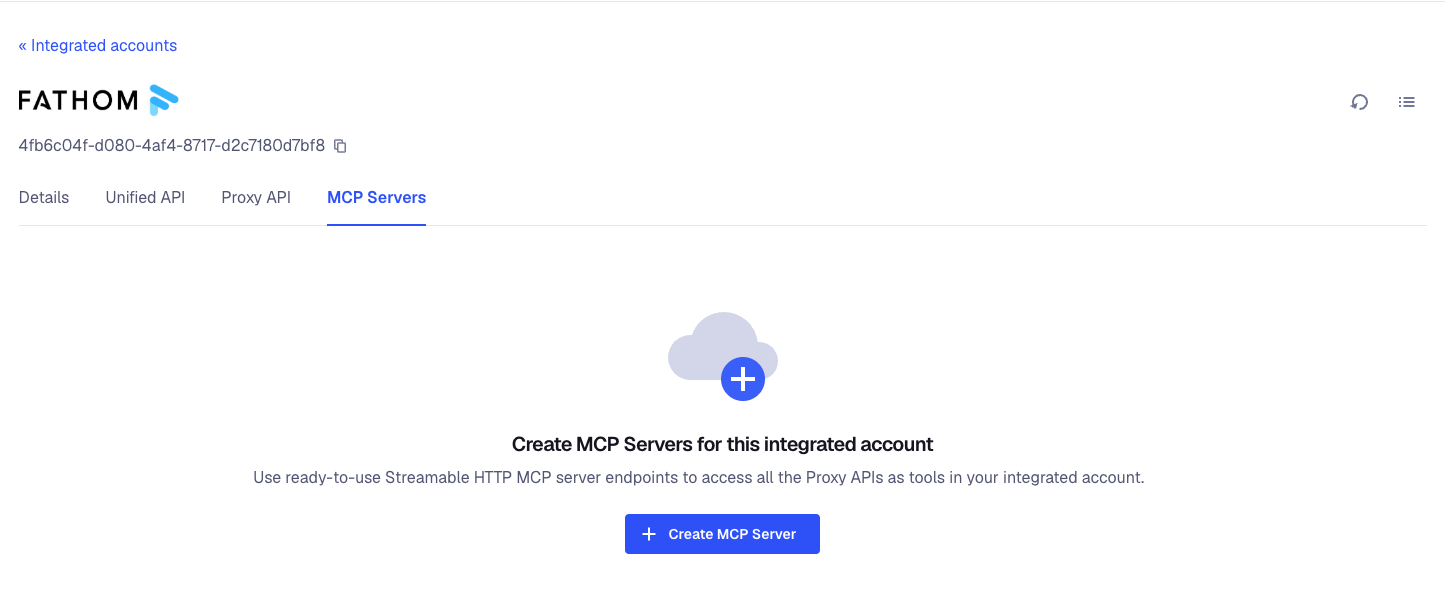
Log into your Truto dashboard and navigate to the Integrated account page for the specific tenant you want to connect.
- Click on the MCP Servers tab.
- Create a new MCP server (this provisions your SuperAI instance).
- Set Permissions: This is where you lock things down. Select the specific methods you want to expose (e.g., read-only, or specific CRUD operations like
listandget).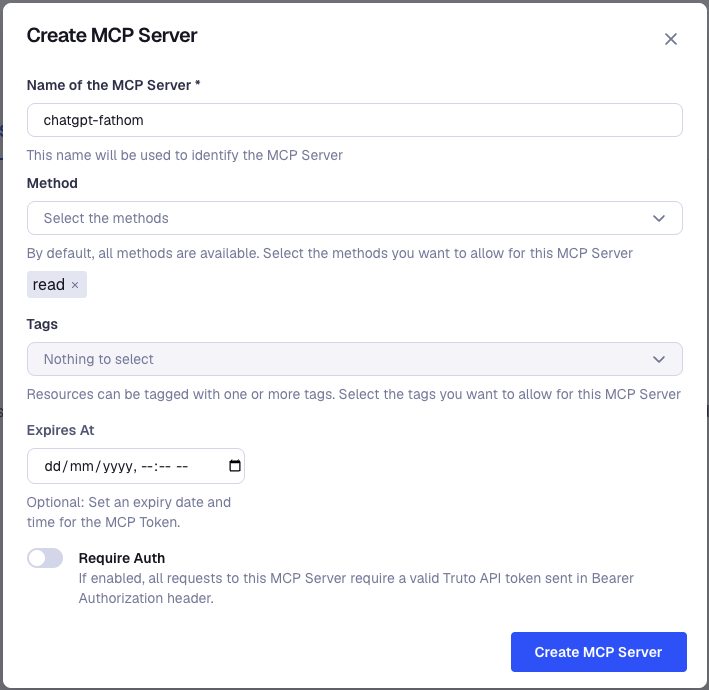
- Add Tags: Group tools by adding tags so you only expose what is strictly necessary for the task.
- Generate your remote MCP Server URL.


2. Enable Developer Mode in ChatGPT
ChatGPT hides MCP support behind a beta flag.
- Open ChatGPT and go to Settings → Apps → Advanced settings.
- Toggle Developer mode to enabled.
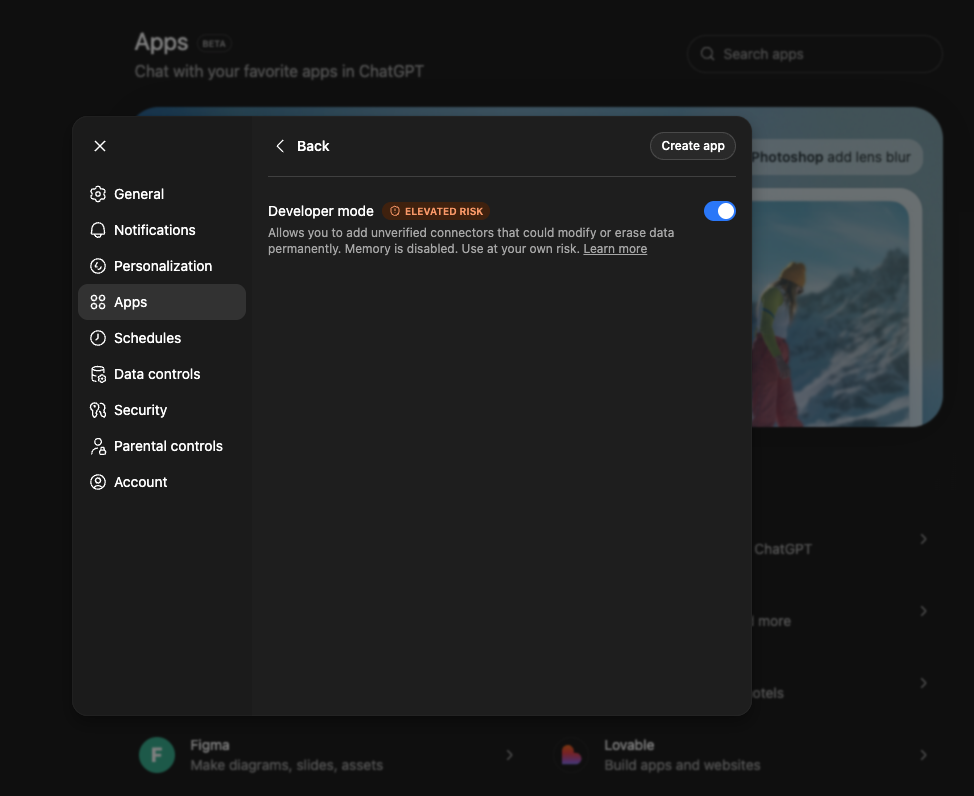

Note on terminology: OpenAI recently renamed "Connectors" to "Apps" in their UI. If you see older documentation referencing Connectors, it is the exact same feature.
3. Register the Truto App
Once Developer Mode is active, click Create app next to the Advanced settings menu.
- Name: SuperAI - Zendesk (or whatever makes sense for your scoped workspace).
- Server URL: Paste the MCP Server URL provided in your Truto dashboard.
4. Execute via Prompt
Start a new chat. Click the + icon in the composer, select Developer Mode, and choose your newly created custom app.
Prompt: "Fetch the latest 5 high-priority tickets from Zendesk, summarize the customer complaints, and draft a response for each."ChatGPT parses the intent, reads the tool descriptions provided by SuperAI, proposes the correct tool call, and executes the raw API request.
The Brutal Truth: Architectural Trade-offs and Risks
We build integrations for a living, which means we spend all day looking at the ugly realities of third-party software. Connecting an LLM directly to your production SaaS stack is highly effective, but you need to be realistic about the architectural trade-offs.
Write Actions Are Dangerous
OpenAI's Developer Mode supports full write operations. If you give an LLM a delete endpoint, it will eventually use it—usually at the worst possible time.
ChatGPT prompts the user with a confirmation modal before executing a write action, but users inevitably get alert fatigue and blindly click "Confirm."
You must enforce strict scoping at the Truto level. Use the granular CRUD controls in the MCP Servers tab. Default to list and get. Only grant create or update access to the specific endpoints necessary for the workflow. Never use admin-level service accounts for LLM integrations.
The Context Window Trap
Exposing an entire CRM's API surface to an LLM is a great way to blow through your context window and confuse the model. This is why SuperAI implements Tagging. By grouping tools with tags, you restrict the MCP server to only expose the exact endpoints needed for a specific agentic task. Keep the tool list small and highly relevant.
The Latency Tax
Physics still applies. When you ask ChatGPT to update a CRM record via SuperAI's MCP Server, the request path looks like this:
- LLM reasoning and tool selection.
- ChatGPT servers send an HTTP request to your SuperAI MCP Server endpoint.
- Truto routes the request to the vendor's API.
- The vendor processes it (and they might be throttling or experiencing degradation).
- The response travels back up the chain.
This is not instantaneous. For synchronous chat interfaces, a 3-to-5 second round trip for a complex API chain is normal. Set expectations with your users accordingly.
Rate Limits Still Exist
We handle the authentication and tool descriptions, but we cannot bypass the physical limits of the underlying SaaS providers. If your ChatGPT workspace aggressively loops through thousands of records using an MCP tool, you will hit the vendor's API quotas. Design your prompts and agent workflows to batch requests where appropriate.
Strategic Next Steps
Wiring ChatGPT to your SaaS stack used to require a dedicated engineering sprint. With OpenAI's MCP support and SuperAI, it takes minutes.
The bottleneck is no longer the integration code. The bottleneck is figuring out which workflows actually benefit from natural language execution. Start small. Give your team read-only (list, get) access to a low-risk platform like your internal ticketing system. Observe how they interact with the data, refine your tool tags, and slowly introduce write capabilities.
If you are ready to stop writing boilerplate integration code and start building actual AI workflows, let's talk.
FAQ
- What is SuperAI by Truto?
- SuperAI by Truto allows you to expose raw vendor APIs directly to LLMs like ChatGPT as reliable, ready-to-use tools via the Model Context Protocol (MCP) without writing integration code.
- How do I connect ChatGPT with custom connectors or apps?
- To connect ChatGPT with custom connectors or apps, enable Developer Mode in your ChatGPT settings (Settings → Apps → Advanced settings). From there, you can register a remote Model Context Protocol (MCP) server URL. Using a service like SuperAI by Truto provides this MCP endpoint instantly, allowing ChatGPT to interact with 100+ SaaS APIs without you having to build or host the connector infrastructure.
- How does SuperAI handle API pagination for LLMs?
- Vendor APIs often have undocumented pagination quirks that cause LLMs to loop infinitely or hallucinate. SuperAI abstracts these edge cases, handling the messy pagination logic behind the scenes so the LLM receives clean data without breaking.
- Does SuperAI use Unified APIs for its MCP servers?
- No. SuperAI exposes the raw vendor APIs. We automatically inject the necessary semantic descriptions and parameters so the LLM understands exactly how to use the raw endpoints without requiring a unified translation layer.
- How do I restrict what ChatGPT can do with my data?
- You can configure granular access controls at the MCP server level within Truto. You can restrict operations to specific methods or exact CRUD actions like list, get, create, update, or delete.
- How do I manage context window limits when exposing APIs?
- SuperAI allows you to group tools using tags. By tagging tools, you only expose the specific endpoints required for a given workflow, keeping the LLM's context window clean and reducing the chance of hallucinations.
- What is an ephemeral MCP server?
- An ephemeral MCP server is a short-lived server that grants temporary API access to an LLM. It automatically expires after a set period, limiting the security blast radius and ensuring AI agents don't retain perpetual access to production data.
- How does SuperAI handle API authentication?
- Truto manages the entire OAuth lifecycle behind the scenes. This includes the initial handshakes, secure credential storage, and automatic token refreshes, ensuring your LLM never drops a request due to an expired access token.


