


Send Truto Logs to OpenTelemetry (OTLP), Splunk, Sentinel, Elasticsearch, and S3
Truto can now stream your integration logs to any OpenTelemetry (OTLP) backend, plus Splunk HEC, Microsoft Sentinel, Elasticsearch, and an S3, GCS, R2, or MinIO archive, in addition to Datadog.


Until now, if you wanted Truto's logs next to the rest of your telemetry, you had one option: Datadog. That worked well for teams on Datadog and not at all for everyone else.
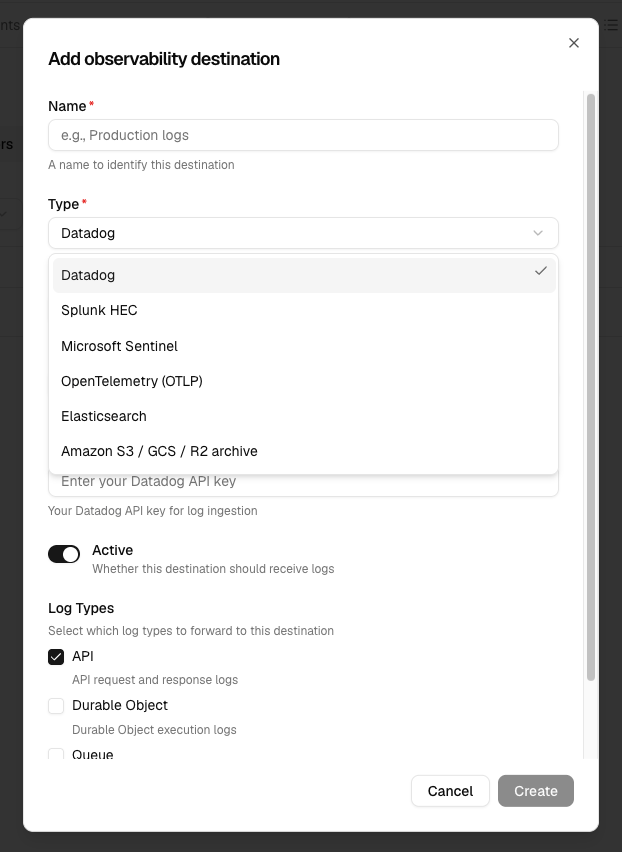
Truto now forwards logs to five more destinations. The headline one is OpenTelemetry (OTLP), because it is the one protocol that most observability tools agree on. The other four cover the places security and platform teams most often asked for: Splunk, Microsoft Sentinel, Elasticsearch, and a cheap S3 archive.
Why OTLP first
Every observability vendor has its own intake API. Building one forwarder per vendor does not scale, and it locks your logs to whichever vendors we happened to build.
OTLP is the wire protocol of OpenTelemetry. Grafana Cloud, Elastic, a self-hosted OpenTelemetry Collector, and a long list of other tools accept it. One OTLP destination in Truto covers all of them. If you change vendors later, you change a URL, not an integration.
What Truto sends
Truto sends OTLP logs over HTTP with JSON encoding. Point the destination at your collector's base URL and Truto appends /v1/logs for you. If the URL already ends in /v1/logs, Truto uses it as it is.
Each Truto log becomes one OTLP log record. The mapping is designed so the logs are useful in your backend without extra parsing rules:
- Timestamps.
timeUnixNanois when the event happened in Truto.observedTimeUnixNanois when Truto forwarded it. - Severity. Truto reads the level from the log line (
INFO,WARN,ERROR, and so on). If there is none, it uses the HTTP status: 5xx isERROR, 4xx isWARN, everything else isINFO. Severity numbers follow the OTel scale, so filters such as "severity ≥ WARN" work. - Body. The log message. If a log has no message, the body is the full log as JSON.
- Attributes. Every Truto field becomes an attribute: integration, integrated account ID, HTTP method, status, duration, and the rest. Objects are serialized to JSON, and long strings are capped at 4,096 characters.
- Semantic conventions. The HTTP fields are also written under their standard OTel names:
http.request.method,http.response.status_code,url.full,user_agent.original, andclient.address. Truto keeps the original field names as well, so your existing Truto queries still work. - Trace context. When a log has a valid
trace_idorspan_id, Truto puts it on the record. Your backend can then link the log to the trace from your own service.
Every request carries one resource with service.name set to truto-api. You can add your own resource attributes, or override the defaults, on the destination. A typical use is to tag logs with your team, product, or deployment name.
A trimmed request looks like this:
{
  "resourceLogs": [
    {
      "resource": {
        "attributes": [
          { "key": "service.name", "value": { "stringValue": "truto-api" } },
          { "key": "team", "value": { "stringValue": "integrations" } }
        ]
      },
      "scopeLogs": [
        {
          "scope": { "name": "truto.observability" },
          "logRecords": [
            {
              "timeUnixNano": "1793270400000000000",
              "observedTimeUnixNano": "1793270400350000000",
              "severityNumber": 13,
              "severityText": "WARN",
              "body": { "stringValue": "2026-10-29T10:40:00.000Z WARN GET /unified/crm/contacts 429" },
              "attributes": [
                { "key": "log_type", "value": { "stringValue": "api" } },
                { "key": "integration", "value": { "stringValue": "hubspot" } },
                { "key": "http_status_code", "value": { "intValue": "429" } },
                { "key": "http.response.status_code", "value": { "intValue": "429" } }
              ]
            }
          ]
        }
      ]
    }
  ]
}
How delivery works
Logging must never slow down your API calls, so forwarding happens off the request path:
flowchart LR
  A[API call, queue job,<br/>or alarm in Truto] --> B[Structured log]
  B --> C[Forward queue<br/>one message per destination]
  C --> D[Batch: up to 1,000 logs<br/>or 5 MB per request]
  D --> E[OTLP endpoint<br/>/v1/logs]
- Truto writes a structured log for each API call, queue job, Durable Object run, and scheduled alarm.
- Truto puts one copy of the log on a queue for each active destination in the environment.
- A queue consumer sends the logs in batches of up to 1,000 logs or 5 MB.
- If your endpoint returns a 429 or a 5xx, Truto retries the batch later and honours
Retry-After. Batches that already went through are never sent again. - If your endpoint returns any other 4xx, Truto drops the batch, because a retry would fail the same way.
Setting it up
In the Truto dashboard, open Settings → Observability in your environment and click to add a destination. Pick OpenTelemetry (OTLP) and fill in:
- Endpoint. The public HTTPS base URL of your OTLP receiver.
- Authentication. None, a Bearer token, or Basic auth (username and password).
- Resource attributes. Optional key-value pairs added to every request.
- Log types. Optional. API, Queue, Durable Object, Alarm, or leave it empty for all.
Use Test before you save. If the endpoint rejects the request, you see the destination's own error message, so you know what to fix.
You can do the same through the API:
curl -X POST https://api.truto.one/observability-destination \
  -H "Authorization: Bearer $TRUTO_API_TOKEN" \
  -H "Content-Type: application/json" \
  -d '{
    "environment_id": "<your-environment-id>",
    "type": "otlp",
    "name": "Grafana Cloud",
    "config": {
      "endpoint": "https://otlp-gateway-prod-us-east-0.grafana.net/otlp",
      "resource_attributes": { "team": "integrations" },
      "log_types": ["api"]
    },
    "secrets": {
      "username": "<instance-id>",
      "password": "<access-policy-token>"
    }
  }'
POST /observability-destination/{id}/test sends a test log to a saved destination.
A few rules keep your credentials safe:
- The endpoint must be a public HTTPS URL. Truto does not follow redirects, so a request cannot bounce to a host that was not checked.
- Secrets are encrypted at rest and never returned by the API.
- If you change the endpoint to a different host, you must enter the secrets again. Stored credentials never go to a host you did not give them to.
Does your vendor need a custom auth header instead of Bearer or Basic? Run an OpenTelemetry Collector with an OTLP receiver, point Truto at it, and let the Collector add the header and export to your vendor. The Collector is also the place to sample, filter, or redact before logs leave your network.
Four more destinations
Splunk HEC. Send logs to a Splunk HTTP Event Collector with a HEC token. You can set the index, source, and source type. Truto shows Splunk's own error text when a send fails.
Microsoft Sentinel. Send logs to a Log Analytics workspace through the Azure Monitor Logs Ingestion API. You give a Microsoft Entra app registration, a data collection endpoint, a DCR, and a stream name. Azure public, US Government, and China clouds are supported.
Elasticsearch. Index logs with the bulk API, using an API key or Basic auth. You can choose the index or data stream, and an ingest pipeline. Documents use Elastic Common Schema (ECS) fields such as @timestamp, log.level, and http.response.status_code, and go to the logs-truto-default data stream by default.
S3 log archive. Write gzipped NDJSON files to Amazon S3, Google Cloud Storage, Cloudflare R2, or MinIO. Files go under Hive-style partitions (year=/month=/day=/hour=), so Athena, BigQuery, and similar engines can query them directly. Use the archive for long retention at storage prices.
Mix and match
Destinations are per environment, and each one gets its own copy of every log. A common setup is OTLP to your day-to-day observability tool, Sentinel or Splunk for the security team, and an S3 archive for long-term retention. Each one has its own log type filter.
Datadog is still supported and works as before. To get started, open Settings → Observability in the Truto dashboard, or talk to us if you need a destination that is not on the list yet.
FAQ
- Which OpenTelemetry backends can receive Truto logs?
- Any backend that accepts OTLP logs over HTTP with JSON encoding at a /v1/logs path and a public HTTPS URL. Truto authenticates with a Bearer token, Basic auth, or no auth. If your vendor needs a custom header, run an OpenTelemetry Collector in front of it and point Truto at the Collector.
- Does Truto send traces or metrics over OTLP?
- No. Only logs are sent. Each Truto log becomes one OTLP log record. If a log carries a valid trace_id or span_id, Truto sets them on the record so your backend can correlate it with traces from your own services.
- What happens if my OTLP endpoint is down?
- Truto retries batches that fail with a 429 or a 5xx response, and honours the Retry-After header. Batches that fail with any other 4xx response are dropped, because a retry would fail the same way. Each request times out after 15 seconds.
- Can I send logs to more than one destination?
- Yes. Every active destination in an environment gets its own copy of each log. You can, for example, send API logs to Grafana over OTLP and archive everything to S3 at the same time.
- Can I choose which logs go to a destination?
- Yes. Each destination has a log type filter: API request and response logs, queue logs, Durable Object logs, and scheduled alarm logs. Leave it empty to send all four.


