---
title: "Product Update: Native Slack & Email Alerts for SaaS API Integration Monitoring"
slug: product-update-native-slack-email-alerts-for-saas-api-integration-monitoring
date: 2026-04-28
author: Yuvraj Muley
categories: [Product Updates]
excerpt: "Stop relying on customer support tickets to find broken integrations. Proactively monitor API errors, webhook failures, and environment token events with Truto."
tldr: "Truto now supports native Slack and Email notification destinations. Route integration health alerts directly to your team, combat alert fatigue with smart filtering, and catch silent failures before customers do."
canonical: https://truto.one/blog/product-update-native-slack-email-alerts-for-saas-api-integration-monitoring/
---
# Product Update: Native Slack & Email Alerts for SaaS API Integration Monitoring
If your integration breaks at 2 AM and nobody gets paged, did it really break? Yes—your customers just found out before you did.
If you need SaaS API integration monitoring without building custom webhook listeners, scheduled checks, and yet another internal alerting service, Truto now supports native Slack and email notification destinations. You can route integration health events straight from Truto to the people who can act on them, instead of learning about broken syncs from a support ticket three hours later.
That matters because silent failures are expensive and common. When an enterprise application goes down or an integration breaks, the financial impact is immediate. ITIC's 2024 downtime survey found that more than 90% of mid-size and large enterprises put the cost of one hour of downtime above $300,000, with 41% of enterprises reporting hourly losses between $1 million and $5 million. Those numbers assume someone *knows* the system is down.
## The Hidden Cost of Silent Integration Failures
Silent integration failures are issues that break data movement or event delivery without producing an obvious, actionable signal. They are the most dangerous type of integration bug:
* OAuth tokens expire and cleanup happens later
* Webhooks degrade until they are disabled
* Upstream APIs start returning `401`, `403`, `429`, or `5xx` responses
* An upstream provider changes a required field, causing background syncs to drop silently
* Everyone assumes someone else is watching the logs
Loud failures are annoying. Silent failures are worse. A `500` in a dashboard gets attention. A webhook that slowly drops events, or a CRM sync that quietly stops writing updates after an auth change, can sit there poisoning customer trust for days.
A 2026 production reliability survey by NeuBird reported that 44% of organizations had an outage tied to ignored or suppressed alerts, and 78% had experienced incidents where no alert fired at all. When monitoring turns into wallpaper, customers end up becoming your detection system.
You see the same thing in webhook-heavy systems. Webhook delivery is inherently fragile. Industry data from Svix shows that 95.8% of webhook messages succeed on the first attempt, leaving a 4.2% failure rate that requires intervention. In one 2025 benchmark of carrier APIs, production testing revealed webhook delivery success rates dropping to 94.2% during European peak hours, with 3.8% silent failures that returned `200 OK` but never triggered downstream processing. A European retailer recently lost €47,000 in manual processing costs during a single weekend outage when their webhook-dependent system fell back to polling.
These aren't edge cases. If you're running integrations across CRMs, HRIS, ATS, or accounting platforms, silent failures are a statistical certainty. The question is how fast you find out.
## Introducing Truto Notification Destinations
Engineers spend too much time building custom webhook listeners just to monitor the health of their integration platforms. If you are using a [unified API for enterprise integrations](https://truto.one/blog/why-truto-is-the-best-unified-api-for-enterprise-saas-integrations-2026/), the goal is to write less integration code, not to spend weeks building a parallel alerting system to watch the unified API.
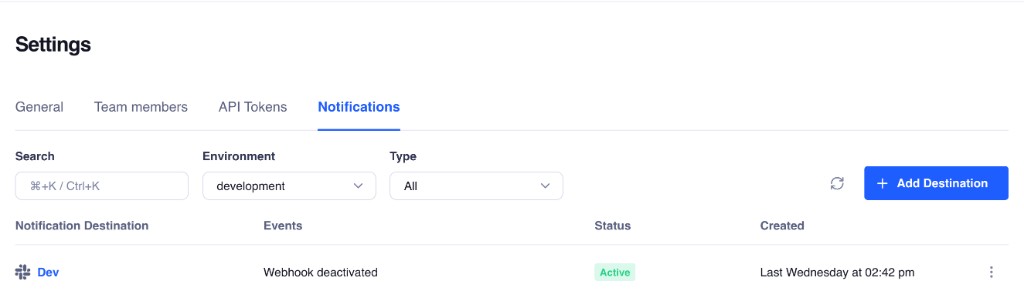
**Notification Destinations** let you route integration health alerts from Truto to Slack or email, per environment, without standing up your own alert router. You pick the events you care about, point them at a Slack webhook URL or an email list, and you're done.
```mermaid
flowchart LR
A["Truto detects
integration event"] --> B["Match event to
active destinations"]
B --> C{"Destination type?"}
C -->|Slack| D["POST to
webhook URL"]
C -->|Email| E["Send to
recipient list"]
D --> F["#eng-alerts channel"]
E --> G["ops@company.com"]
```
Behind the scenes, we engineered this delivery system for high reliability. Alerts are not fired off as simple, unmonitored HTTP requests. We queue notifications asynchronously and store large payloads in dedicated object storage before delivery. This ensures that even if an alert contains a massive stack trace or a complex error object, it reliably reaches your Slack workspace or email inbox.
Each destination is scoped to an **environment**, so your staging alerts don't pollute your production Slack channel. Slack uses incoming webhooks, which accept JSON payloads and support Block Kit formatting. Truto sends formatted messages that are readable in-channel and still sane in notification previews because we utilize both structured `blocks` and fallback `text`.
The honest version: this will not replace your incident platform. It will not fix provider outages. It will not make terrible vendor docs less terrible. What it does do is shorten the time between an integration failing and someone relevant knowing about it.
## Customer-Configurable Events: Alerting on What Matters
Not every event deserves a Slack notification. Truto exposes a focused set of **customer-configurable event types** designed around the failure modes that actually matter in production:
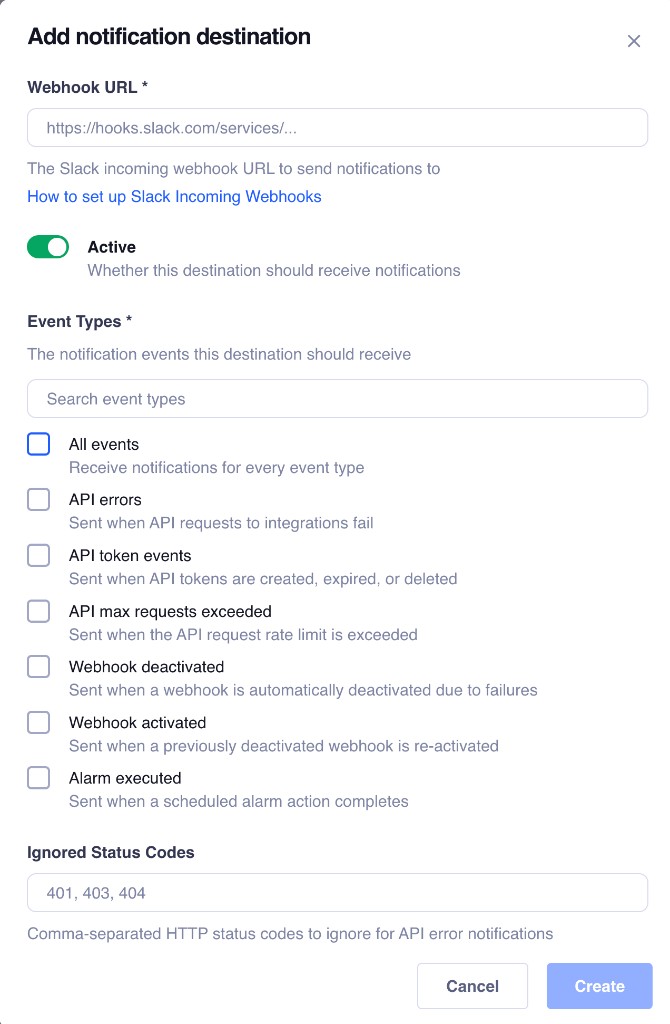
| Event | What it tells you | Why you care | Good first action |
|---|---|---|---|
| `all` | Receive notifications for every event type | Good default for sandboxes | Usually too noisy for a production Slack channel |
| `api_errors` | Sent when API requests to integrations fail | Catches upstream API degradation before your customers notice | Check request and response history in [API Logs](https://truto.one/blog/product-update-api-logs/) to confirm auth, schema, or provider-side faults |
| `api_token_events` | Sent when API tokens are created, expired, or deleted | A revoked environment API token severs your application's access to Truto | Rotate the token and update your backend configuration |
| `api_max_requests_exceeded` | Sent when the API request rate limit is exceeded | API calls may be rejected until the limit resets | Check your usage dashboard and review application polling rates |
| `webhook_deactivated` | Sent when a webhook is automatically deactivated due to failures | Silent webhook failures are the most dangerous kind | Check the receiving endpoint and replay logic against our [webhook reliability guide](https://truto.one/blog/designing-reliable-webhooks-lessons-from-production/) |
| `webhook_activated` | Sent when a previously deactivated webhook is re-activated | Confirms that outbound event delivery has resumed | Verify your endpoint is processing the newly delivered events |
What matters here is scope. These are not vanity notifications about a thing happening somewhere. They are operational signals that usually require a concrete next step.
### API Errors and Sync Failures
`api_errors` is probably the first one most teams should turn on. Consider a scenario where your application syncs leads to a customer's CRM. The customer's CRM administrator marks a previously optional custom field as required—a common issue with [rigid unified API schemas](https://truto.one/blog/your-unified-apis-are-lying-to-you-the-hidden-cost-of-rigid-schemas/). Your next POST request fails with a `400 Bad Request`. Without proactive monitoring, this batch of leads is lost silently.
The right way to handle [inconsistent third-party API errors](https://truto.one/blog/404-reasons-third-party-apis-cant-get-their-errors-straight-and-how-to-fix-it/) is not to spray every `401`, `403`, `422`, and `500` into a chat channel until people mute it. The better pattern is summarization. Instead of blasting you with every individual raw HTTP failure, Truto summarizes errors for your environment. One alert that tells you an environment is failing in a repeatable way is useful. Three hundred near-identical alerts are theater.
### API Token Lifecycle Events
The `api_token_events` subscription monitors the Bearer tokens used by your application to authenticate with the Truto API. These are environment-scoped credentials, not third-party OAuth tokens.
When an environment API token is created or deleted, Truto fires this alert. If a token is deleted unexpectedly, your application will immediately lose access to the Truto platform. Subscribing to this event ensures your security or platform team is notified instantly if an API token is revoked, allowing them to rotate credentials and restore service before background jobs start failing with `401 Unauthorized` errors.
### Webhook Deactivation
The `webhook_deactivated` event solves a problem that catches teams off guard more than anything else. If your receiving endpoint goes offline or consistently returns 500-level errors, Truto's delivery queues will attempt to retry the payload based on an exponential backoff schedule.
If the endpoint remains unhealthy and exhausts its retry budget, Truto automatically deactivates the webhook to protect queue health and prevent infinite retry loops. Subscribing to this event ensures your infrastructure team is immediately notified when a webhook is disabled, allowing them to fix the endpoint and reactivate it before data is permanently lost.
```mermaid
sequenceDiagram
participant Provider as Upstream SaaS
participant Truto as Truto Platform
participant Webhook as Customer Endpoint
participant Slack as Slack Alerts
Provider->>Truto: Event Occurs
(e.g. Contact Updated)
Truto->>Webhook: POST /webhook (Attempt 1)
Webhook-->>Truto: 500 Internal Server Error
Note over Truto,Webhook: Retries exhaust based on
exponential backoff schedule
Truto->>Truto: Deactivate Webhook
Truto->>Slack: POST webhook_deactivated alert
```
> [!NOTE]
> A practical starting point for production is one destination per environment, subscribed only to `api_errors`, `api_token_events`, and `webhook_deactivated`. Save the `all` wildcard for sandbox or for a low-noise ops mailbox.
## Combating Alert Fatigue with Smart Filtering
Monitoring systems are only useful if people actually read the alerts. Good integration monitoring reduces noise on purpose.
There is plenty of research backing the obvious: noisy alerts are not harmless. Academic research on industrial cloud alerting (like the widely cited DSN paper) found that misleading and non-actionable alerts actively hinder engineers from locating and fixing faulty services quickly. According to a 2026 survey of 1,039 SRE and DevOps professionals, 77% of on-call teams receive at least ten alerts per day, and 57% report that fewer than 30% of those alerts are actionable. Data from PagerDuty reveals that teams receiving more than 40 alerts per shift see roughly 3x higher Mean Time To Resolution (MTTR) than teams receiving fewer than 10.
If your Slack channel turns into a landfill, engineers stop trusting it. Noise burns people out before it burns budgets. Truto combats alert fatigue through smart filtering.

When configuring a Slack destination for `api_errors`, you can specify `ignored_status_codes`—a list of HTTP status codes you don't want to be notified about. If your application logic expects a `404 Not Found` when checking if a record exists before creating it, or if you regularly hit `401`s from a vendor that rotates tokens aggressively and you handle re-auth automatically, you can add those to your ignored list.
```json
{
"type": "slack",
"label": "Production API alerts",
"environment_id": "env_123",
"event_types":["api_errors"],
"config": {
"webhook_url": "https://hooks.slack.com/services/T00/B00/xxx",
"ignored_status_codes":[401, 403, 404]
}
}
```
One important nuance: those ignored codes affect `api_errors` generation. They suppress the specific errors from the summary payload. They are not a trick for suppressing Slack delivery failures themselves. The actual errors still get logged in API Logs—you just won't see them in Slack.
## Honest, Transparent Rate Limit Handling
Many integration platforms attempt to mask upstream rate limits by absorbing HTTP `429 Too Many Requests` errors and automatically retrying them. This is an architectural anti-pattern. Masking rate limits creates a black box of latency, leaving developers wondering why a request took 45 seconds to complete and creating the worst kind of support ticket: "sometimes it just hangs."
> [!WARNING]
> Truto takes a radically transparent approach. We do **not** silently retry, throttle, or absorb rate limit errors. When an upstream API returns a `429`, Truto passes that exact error directly back to your application.
We normalize the upstream rate limit information into standardized headers following the IETF RateLimit specification. Your application receives clear, predictable headers regardless of which third-party API you are calling:
```http
HTTP/1.1 429 Too Many Requests
ratelimit-limit: 1000
ratelimit-remaining: 0
ratelimit-reset: 1678901234
Retry-After: 60
Content-Type: application/json
{
"error": "Rate limit exceeded for upstream provider."
}
```
Passing the `429` directly to the caller ensures your engineering team retains full control over retry logic, jitter, queueing, and circuit breaking. You can read more about building resilient retry architectures in our guide to [handling API rate limits across multiple third-party APIs](https://truto.one/blog/best-practices-for-handling-api-rate-limits-and-retries-across-multiple-third-party-apis/).
Because Truto passes `429` errors directly to your application, you can choose whether or not to include `429` in your `ignored_status_codes` for Slack alerts. If you have a resilient backoff system in place, ignore `429`s to prevent channel spam. If you want to know exactly when you hit limits, leave them enabled.
## How to Set Up Slack and Email Alerts in Truto
Configuring notification destinations takes less than two minutes and requires zero code changes to your application. Setup is short. The hard part is choosing the right signal, not clicking the buttons.
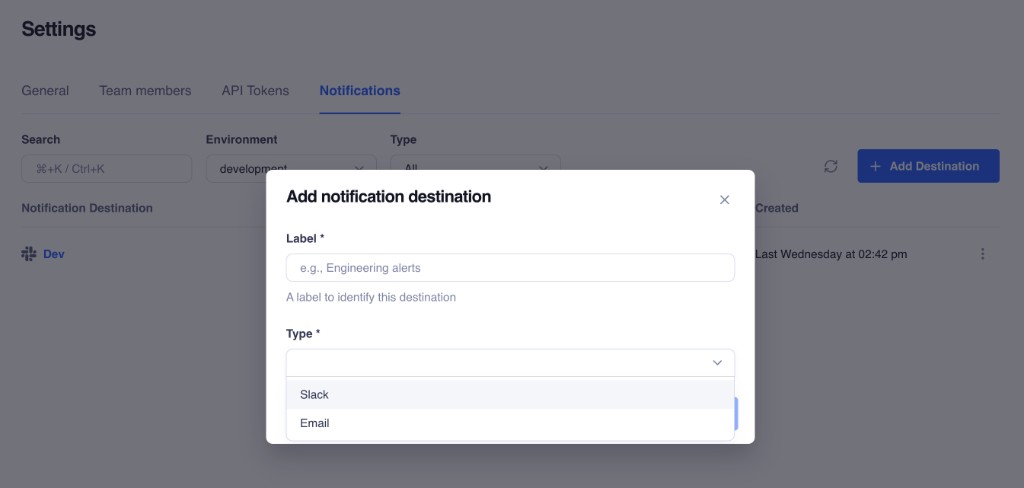
1. **Access Notification Settings:** Navigate to **Settings → Notifications** in your Truto dashboard for the environment you want to monitor.
2. **Create a New Destination:** Click the button to create a new destination and choose either Slack or Email.
3. **Configure the Delivery Channel:**
* For Slack, paste your incoming webhook URL and input any ignored status codes.
* For Email, provide a comma-separated list of recipients for the To, CC, and BCC fields. You can also define a custom subject prefix (defaults to `[Truto]`) to help your email client automatically filter and categorize the alerts.
4. **Select Event Types:** Choose the events you want to monitor. New destinations default to subscribing to `all`. That is convenient for testing, but for production you should narrow the event set immediately to `api_errors`, `api_token_events`, and `webhook_deactivated`.
5. **Test and Save:** Send a test notification before you point a production team at it to confirm delivery.
You can also manage destinations programmatically via the API or the [Truto CLI](https://truto.one/blog/introducing-truto-cli/):
```bash
# Create a Slack notification destination
truto notification create \
--type slack \
--label "Eng alerts" \
--config '{"webhook_url": "https://hooks.slack.com/services/..."}'
# Test it
truto notification test --id
```
Multiple destinations per environment are fully supported. You can route `api_errors` to your `#eng-integrations` Slack channel, `webhook_deactivated` to PagerDuty via an email ingestion address, and `api_token_events` to your ops team's inbox. Each destination is independent.
```mermaid
flowchart TD
subgraph Events
E1["api_errors"]
E2["webhook_deactivated"]
E3["api_token_events"]
end
subgraph Destinations
D1["#eng-integrations
Slack"]
D2["ops@company.com
Email"]
D3["oncall@company.com
Email"]
end
E1 --> D1
E2 --> D1
E2 --> D2
E3 --> D3
```
For security, Truto strips the configuration secrets (like your raw Slack webhook URL) from API responses after the initial setup. If you need to edit a Slack destination later, you only need to explicitly provide a replacement URL if you are rotating it.
## Stop Polling Your Dashboards. Start Reacting.
Every integration team has two options: find problems proactively, or wait for customers to report them. Relying on customer support tickets to find out an integration is broken is not a viable strategy for enterprise SaaS. The second option comes with support tickets, churn risk, and a reputation for unreliability.
SaaS API integration monitoring is not about sending more messages. It is about shortening the gap between failure and action. Native Slack and email notifications give you a practical middle layer between "we have raw logs somewhere" and "we need a full incident response project."
By routing API errors, environment token events, and webhook failures directly to your team's existing communication channels, you shift from a reactive posture to a proactive one. A revoked API token gets flagged before your background jobs fail. A degraded webhook endpoint gets surfaced before data goes stale. An API error spike gets noticed before it becomes an incident. Paired with API Logs, they give you both halves of the job: detect the break, then inspect the cause.
That will not eliminate integration failures. Nothing will. Third-party APIs still change behavior without warning. Webhooks still fail at the worst time. Auth still breaks in weird, vendor-specific ways. But at least the failure stops being silent, and that alone saves real engineering time and builds trust with your end-users.
> If your team is tired of finding broken integrations from support tickets, set up notification destinations for your production environments. Talk to our engineering team to see how Truto's unified API and native monitoring can streamline your integrations.
>
> [Talk to us](https://cal.com/truto/partner-with-truto)